1
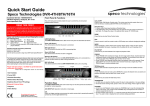
Rear Panel Connections
JOG/SHUTTLE on Front Panel
The jog/shuttle knob, shown in the figure below:
There are several connectors on the rear panel of the DVR-4TN/8TN/16TN series
DVRs. The following figure shows the connectors by name and a detailed description
of each connector follows.
Power Switch
Used to power up and shut down the unit.
Call Monitor (BNC)
The call monitor is used to display full screen video of all installed cameras in
sequence. The BNC call monitor connector allows the user to connect an optional call
monitor to the DVR-4TN/8TN/16TN series unit.
Video Input
A group of BNC connectors are available for video inputs from installed cameras.
The number of connectors is equal to the number of channels; the
DVR-4TN/8TN/16TN units have 4/ 8/ 16 BNC connectors on the rear panel,
respectively.
It is a combination of a shuttle ring with an embedded jog disk, which is used to provide
wide latitude in playback control. Note that the jog/shuttle knob is active only when the
DVR unit is in Playback mode.
Camera Looping
Groups of BNC connectors are positioned on the real panel for looping out
video input.
Typical System Configuration Illustration
Main Monitor (S-Video/ BNC/ VGA)
S-Video, BNC and VGA output connectors are available for connecting to a main
monitor. The main monitor displays live image and playback recorded video in full
screen or multiple window format.
RS-232C
The unit provides a RS-232C communication port for sending and receiving signals.
While playing back video, you can use the shuttle ring to select different speeds of
forward and backward playing. Rotating the shuttle ring counterclockwise causes the
unit to playback in fast forward/ backward playing speed. According to the angle you
rotate the shuttle ring, you can choose the playing speed from 1x, 2x, 4x, 8x, 16x, and
32x, in both forward and reverse directions, shown in the figure below:
Alarm I/O & RS485 Port
The unit provides an Alarm I/O and RS485 port that offers user the flexibility required
to connect the unit to another device.
IEEE1394 (x2)
DVR-4TN/8TN/16TN series unit is equipped with two IEEE1394 (FireWire) ports for
extended connections.
Audio In / Out
The DVR-4TN/8TN/16TN series unit provides one channel of audio recording and
playback. The Audio In RCA connector is offered for connecting an audio source device
(e.g. external amplified microphone) to the unit. The Audio Out RCA connector is
available for connecting an audio output device (e.g. amplified speakers) to the unit.
USB 2.0 (x3)
There are two USB2.0 ports on the rear panel and one on the front panel to allow
users to connect external USB devices to the unit, such as a ThumbDrive.
The DVR-4TN/8TN/16TN allows the user to preset the OSD settings using a
USB mouse.
Inside the shuttle ring is the jog disk, shown in the illustration below, it can turn
completely in either direction. Once you freeze the video, you can use the jog disk to
go to single-step play back. Clockwise rotation causes forward one-step playback; and
counterclockwise rotation causes backward one-step playback.
LAN (RJ-45)
The DVR-4TN/8TN/16TN series is capable of networking. The LAN port allows
the DVR-4TN/8TN/16TN series to access the network/Internet through a 10/100
Ethernet connection.
www.specotech.com
1-800-645-5516 X 196