1
1
USING NIMBUS
QUESTIONS?
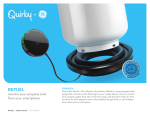
Place the Nimbus on a flat hard surface
For service and support or tutorials, visit
http://www.quirky.com/wink/nimbus/faq,
email us at questions@quirky.com or
call 1-866-5QUIRKY.
2 To snooze, tap the clock once.
3 To turn alarm clock off, tap twice.
4 Use the Wink app to set and change
alarm preferences at any time.
IMPORTANT SAFETY
INSTRUCTIONS/WARNINGS
5 Additional features and capabilities
can be found on the Wink app.
TROUBLESHOOTING
If Wi-Fi® is not connected, any scheduled
alarms may not execute depending
on the outage time. Re-connect the
Wi-Fi® network.
GETTING STARTED
1
Download and install the Wink app
on your mobile device as outlined in
the Quick Start Card. The app will
enable a Wi-Fi® connection between
your mobile device and Nimbus.
2 Turn Nimbus ON by plugging it in,
using the included AC adapter.
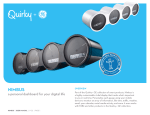
3 Open the Wink app. Follow the app’s
instructions to connect to your Nimbus
and to set up the information you would
like each of its four dials to display.
Your mobile device connects by sending
light pulses into a sensor on your Nimbus.
It is best to do this in a dimly lit environment.
NIMBUS | USER MANUAL | V-O2 | PAGE 3
If you do not get push notifications on your
mobile device from the Wink app as you
have specified in the app, please check that
notifications are turned on for Wink app in
your mobile device’s notification settings.
PRECAUTIONS, CARE
& MAINTENANCE
DO NOT submerge Nimbus in water.
DO NOT wash Nimbus in a dishwasher.
DO NOT expose Nimbus to heat sources.
Use care to avoid dropping Nimbus or subjecting it
to severe impact, which could damage the product.
Clean product with a damp, soft cloth.
Always use the adapter included with the unit.
The use of adapters not authorized by the
manufacturers can damage the product and
increase risk of shock and fire.
CAUTION
To reduce the risk of electric shock, do not remove
cover (or back). No user-serviceable parts inside.
Refer servicing to qualified service personnel.
WARNING
To reduce the risk of fire or electric shock, do not
expose this appliance to rain or moisture.
CAUTION
To completely disconnect this product from
power, disconnect the adapter plug from the wall
outlet. The adapter plug is used to completely
disconnect the power supply to the unit and must
be within easy access to the user.
CAUTION
To reduce the risk of electric shock, do not
perform any servicing other than that contained
in the operating instructions unless you are
qualified to do so.
CAUTION
Wink devices connect by receiving flashing light
patterns that come from your phone’s screen.
Please note that a very small percentage of
individuals may experience epileptic seizures
when exposed to such light patterns or flashing
lights. If you have an epileptic condition,
consult your physician prior to using this app
to connect a device.