1
To cancel single or multiple margin indentations, 13Q is used to 'reset'
the margin to tab slot 0 (no matter how many[;] s had been used up to
that point). This will show g on the display.
Offset Side Numbers
To 'step' back one slot at a time,! ]| ' ]is used. Each[ ] [ ' jsteps back one
slot, and shows a < sign on the display. BE VERY CAREFUL not to use.
moredecrements (| |[' |) than the number of ["*] you previously
used as this can cause quite a few formatting problems.
Another frequent requirement is to print paragraph numbers to the left
of a sequence of indented paragraphs. The example below is also the
explanation of how this is easily done:
1. Having made the "paragraph gap" by keying [C](£], the paragraph
number is written.
2. In order that the text ON THE SAME LINE (i.e. the first line of the
paragraph) is intended, the tab command,[J], is used.
STEPPED PARAGRAPHS
Sometimes, you might want successive paragraphs to step in from the
left and then, by stages, step out to the right again. (This is typical of a
lot of business reports).
3. In order to ensure that ALL SUBSEQUENT text in the same
paragraph is also indented, Q] is keyed IMMEDIATELY AFTER the
|T] has been keyed.
4. After each indented paragraph has been written, |M] Q is used to
reset the margin.
5. The process is repeated.
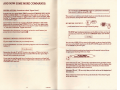
Ml ' ] - Margin Re-set
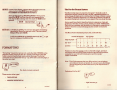
1. In order to describe easily the process of successively indenting
paragraphs and then "stepping back out again", each paragraph is
numbered. This paragraph is printed from the normal left margin,
i.e. tab slot 0.
2 O n e ' ' has now been keyed to bring paragraph 2 in by 5
character positions. Paragraph 3 shows how a heading for
an indented paragraph can easily be written.
3. This is paragr. ph 3.
All that is necessary is to remember to key the
required number of ' ns BEFORE each "paragraph
gap". (|C; [C]) is keyed. Once this has been done,
subsequent carriage returns automatically go to the
indented margin.
4. To bring this paragraph back again by only 5 positions,
[J'' was keyed ONCE ONLY before iCj[Cj. If a return to the
main, "normal" margin at tab slot 0 was required,L][l]
would have been keyed twice. Paragraph 5 will be
repositioned at slot 0.
5. Here's where we started from! The; ]['.] keyed before writing this
paragraph effectively cancelled the indentation achieved by using
r 'n before writing paragraph 2.
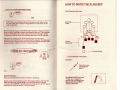
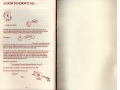
Here's a Summary:
page
normal margin
and shows -» on the display
M; !
page
indented margin
,i '/
... and shows 3 on the display
continued
39