1
1.4
Settling Time
An adequate settling time should be allowed after applying power to the counter to
allow it to adjust to its installed environment. The two LEDs will flash alternately until
the counter has stabilised and is fully operational. Typical settling time is between 45
seconds and 2 minutes, dependant on the temperature difference between where the
counter has been stored and where it is installed. For example, if a counter is installed
shortly after being moved from a cold place then it will take approx 2 minutes, but if the
counter is merely rebooted then it will take much less time. If the counter is still settling
when you connect to it, you will be able to configure all IP settings or relay settings, but
configuration of the main counter functionality may be a little restricted until the settling
time has elapsed and the counters field of view is accessible.
2 COUNTER CONFIGURATION
2.1
Introduction
Counters require a number of different settings before they will function correctly and
provide valid count data for use in a complete system offering. Firstly, if they are IP
enabled devices, they must be configured to communicate on the IP network. This
involves entering a unique network IP address and other relevant network details.
Relay enabled units must be configured with the correct relay pulse settings so that
they interface correctly with the relay accepting logging unit that they are connected to.
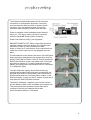
All counters must also be configured so that they count correctly, and accurately. This
is done by configuring the virtual counting lines within the counters field of view and
choosing the correct count mode as well as other counting parameters. The way these
settings are made is sometimes different depending on the connection method type
(serial or IP) and method (web browser or executable software version) employed. See
below for more details.
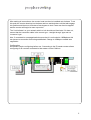
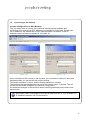
The following sections detail configuration of the IP counter via an IP connection, and
using an Internet Browser. For details of configuring the Relay enabled units, see
section 7.18.
12