1
info@tursdaletechnicalservices.co.uk
Manual ..................................................................................................................................... 1
Touch Screen Weather Station ................................................................................................ 1
PCE-FWS 20 ........................................................................................................................... 1
Operation Manual .................................................................................................................... 3
About this manual .................................................................................................................... 3
Glossary of Common Terms .................................................................................................... 3
DCF/WWVB ......................................................................................................................... 3
LCD ...................................................................................................................................... 3
BAROMETER & BAROMETRIC PRESSURE ..................................................................... 3
RELATIVE AIR PRESSURE ................................................................................................ 3
ABSOLUTE AIR PRESSURE .............................................................................................. 3
INCHES OF MERCURY (inHg) ............................................................................................ 3
HECTOPASCALS ................................................................................................................ 3
Getting Started ........................................................................................................................ 4
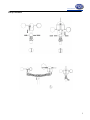
Setup Sensors ..................................................................................................................... 5
System Start ............................................................................................................................ 7
Positioning ............................................................................................................................... 8
Setting Up ................................................................................................................................ 8
indoor temperature ............................................................................................................... 8
outdoor temperature............................................................................................................. 9
Indoor humidity .................................................................................................................. 10
Outdoor humidity ................................................................................................................ 11
Wind speed ........................................................................................................................ 11
Rain.................................................................................................................................... 12
Weather forecast ................................................................................................................ 13
Pressure ............................................................................................................................. 13
Pressure bar graph ............................................................................................................ 14
Time ................................................................................................................................... 14
Date ................................................................................................................................... 15
Memory .............................................................................................................................. 16
PC Connection ...................................................................................................................... 16
Data Storage ...................................................................................................................... 16
Data Recall ........................................................................................................................ 16
Connections and Software ................................................................................................. 16
PC software installation ......................................................................................................... 16
Specifications ........................................................................................................................ 18
Outdoor data ...................................................................................................................... 18
Indoor data ......................................................................................................................... 19
PC Software User Manual ..................................................................................................... 19
General Information ............................................................................................................... 19
System Requirements ........................................................................................................... 20
Installation of the “EasyWeather” Software............................................................................ 20
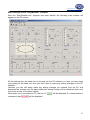
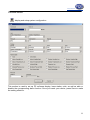
Basic Settings of the “EasyWeather” Software ...................................................................... 21
Function button: ................................................................................................................. 22
2