1
Table of Contents
Table of Contents ................................................................................................................. iii
ViewCommander-NVR User Guide ....................................................................................... 1
Video Sources - IP Cameras and IP Video Servers ............................................................. 2
Video Source Connectivity .................................................................................................. 2
Video Source Settings ......................................................................................................... 2
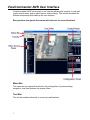
ViewCommander-NVR User Interface .................................................................................. 3
Menu Bar............................................................................................................................. 3
Tool Bar............................................................................................................................... 3
Video Source Panel............................................................................................................. 4
Live Video ........................................................................................................................... 4
Configuration Panel ............................................................................................................. 4
Control Panel ...................................................................................................................... 4
System Settings .................................................................................................................... 5
Global Settings .................................................................................................................... 5
Master Schedule.............................................................................................................. 5
Security Settings.............................................................................................................. 6
Email Settings ................................................................................................................. 6
Web Access ........................................................................................................................ 6
Enable Web Access ........................................................................................................ 6
Web Server Port .............................................................................................................. 6
IP address ....................................................................................................................... 6
System Settings .................................................................................................................. 6
Enhance Thumbnail Images ............................................................................................ 6
Tray Icon When Minimized .............................................................................................. 7
Video Transition Effects ................................................................................................... 7
Run in Full Screen Mode ................................................................................................. 7
Use Default Proxy Settings .............................................................................................. 7
Use 24 Hour Time Format ............................................................................................... 7
Use European Date Format ............................................................................................. 7
Remote Desktop Optimization ......................................................................................... 7
Video Archive Settings ........................................................................................................ 7
Default Archive Drive ....................................................................................................... 7
Disk Space Options ......................................................................................................... 8
Updates ............................................................................................................................... 8
“Check for Updates” button. ............................................................................................. 8
Check for Updates When System Starts. ......................................................................... 8
Additional Options ............................................................................................................... 8
Reset and Clear All Settings ............................................................................................ 8
User and Password Security Settings ................................................................................. 9
User List .............................................................................................................................. 9
“admin” Account ............................................................................................................ 10
“default” Account ........................................................................................................... 10
Add User Button ................................................................................................................ 10
User Level Access............................................................................................................. 11
Switching Users................................................................................................................. 12
Video Source Setup and Configuration ............................................................................. 13
Add New Video Source ..................................................................................................... 13
Video Source Setup .......................................................................................................... 14
Device Model ................................................................................................................. 14
Host Name or IP ............................................................................................................ 14
iii