1
12-central stop without reaction
USER MANUAL
Functions of the control DMX channels
Before you initial start up this lighting, please read the following instructions carefully!
Mode full control DMX512 by signal /8DIP in condition ON/
Important: Damages caused by the disregard of this user manual are not subject to
warranty. We will not accept liability for any resulting defects or problems. There fore,it is
absolutely necessary for you to follow the safety instructions and warning notes written in
this manual.
This lighting is only for power supply 230V/50Hz.
For safety reasons, unauthorized modifications are forbidden! Not only damages to the
lighting can be the result of unauthorized use but also you may endanger your own and
the safety of others.
The electric connection must be carried out by qualified person.
This devise is an effect lighting and was not designed for permanent use.
When you install the lighting, make sure that there is no highly Flammable material in
between a distance of 1m (such as decoration articles, curtains, wooden ceiling etc.
Please keep away from children- lamp generates high temperature.
Lamps are not subject to warranty.
Channel no.1
Channel no.2
0-54
motor no.1 stops
55-155 motor no.1 is rotating to the right/ 55 min. speed, 155- max.
speed /
156-255motor no.1 is rotating to the left / 156 min.speed, 255
max.speed/
0
motors stop
1-54
motor no.2 stops
55-155 motor no.2 is rotating to the right /55 min.speed, 155 max.speed
156-255 motor no.2 is rotating to the left /156 min.speed, 255 max.speed
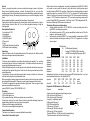
Mode control adjusting 0-10V /8DIP in condition OFF/
Channel no.1 0-15
PRG1 16-39 PRG2 40-63 PRG3 64-79 PRG4
80-95 PRG5 96-119 PRG6 120-135PRG7 136-159 PRG8 160-175 PRG9
176-207 PRG10
208-223 PRG11
224-255 BlackOut, motors stop
Channel no.2
0
motors stop
1-255 normal mode
Maintenance
Disconnect the device from the mains before any maintenance work!
To secure no failure operation and long lifetime it is essential to clean the device
regularly. Dust with smoke from fog machines, air moisture and cigarette smoke is being
built up on the body of the device, but mainly on optical system objective. Dust penetrates
through the ventilator inside of the device and settles on internal optical system
consequently the light output is reduced radically.
Because there is a bigger danger of failure it is necessary to maintain regularly. Follow
these rules for cleaning:
Objective requires cleaning by soft-cloth moistened in weak soapy solution. Internal
parts, like optical system, gobo, dichroic filters clean monthly the same way, with soft
smooth cloth moistened in weak soapy solution. The gobos clean by soft brush. The
interior of the projector should be cleaned monthly. Ventilator and cooling fans should be
cleaned monthly by soft brush and vacuum cleaner. Adapt cleaning interval to density of
operating time.
Never use for cleaning any solvents and similar chemicals, grinding sponge for
dishwashing, washing powder or cleaning agents with grinding effect.
Ventilation
It is necessary to ensure cooling fans against their covering and secure the device to have
admission of air. If temperature reach 77grd, thermal fuse placed in device will disconnect
of the mains.
Never use device without thermal fuse!!!
Location
Don't install the device at places with mechanical shakings and vibrations, high dustiness
or high temperature. Not keeping these conditions can lead to shorter lifetime or its
damage.
DON´ T expose the device to influence of water, rain or moisture. It could lead to electric
shock or fire.
Supply voltage
Don´t use any other supply voltage meant in technical specification and manufacture
label. Not keeping proper supply voltage could lead to damaging the device,starting a fire
or its wrong function.
Power cord
Check if power cord is not mechanical damaged and if it is connected properly. Check
also if the socket is designed sufficiently for needed loading. Otherwise there is a danger
of electric shock or a fire. Power cord must not be bent excessively, led through sharp
edges or given to mechanical stress. Don´t pull the supply lead out by the flex but only by
the plug. The device must always be connected behind the main switch. Do not touch the
supply lead with vet hands, you are threatened by electric shock.
Other important cautions
Don´t poke any objects into cooling fans and ventilator, it could lead to serious electric
shock or damaging the device. Be careful of no water or other liquid entering.
Maintenance and cleaning
Don´t use any solvent and similar chemicals which could damage surface finish or some
parts of device. Use soft and smooth cloth for cleaning optical parts of device and its
surface. Never use washing powders or other cleaning agents with grinding effect.
Connect the device to power supply after complete drying.