1
Chapter 5: GS2 Modbus Communications
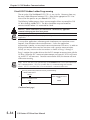
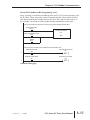
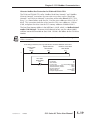
DirectLOGIC Modbus Ladder Programming (cont.)
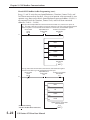
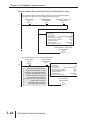
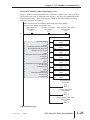
Separate Run Command Write Instruction
Why do we write the Run Command with a separate write instruction? If we write
the Run Command to the drive along with the Speed Reference, Direction, External
Fault, and Fault Reset Commands, we can keep the parameter addresses in sequence,
and we can update all five of the commands with one write instruction. This method
is valid only if we disable the drive’s keypad STOP button (P3.00 = 04).
Typically, the keypad STOP button will be enabled (P3.00 = 03), and we need to
prevent a change in one of the other commands from overriding a keypad Stop
Command by causing a previous Run Command to be rewritten to the drive. By
using a separate Run Command write instruction, only a deliberate Run Command
change by the program will run the drive again after a stop.
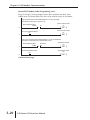
Block Transfer Parameters
For writing to any of the parameters from P0.00 to P8.01, a group of 15 block transfer
parameters (P9.11 to P9.25) is available in the GS2 AC drive. This sequential block of
parameters can be used to "group" various miscellaneous non-sequential parameters,
so that you can update the parameters in one programming write block instead of
having to use multiple WX commands.
For example: If you need to change the PID setpoint (P7.11), accel time (P1.01), and
multi-speed 1 (P5.01), this would typically take three different WX commands
because the parameters are non-sequential. However, by setting P9.11 to P7.11,
P9.12 to P1.01, and P9.13 to P5.01, the parameters become sequential, and can be
controlled using one WX command (LD Kf201, LD K6, LDA Oxxxx, WX V4413).
1st Ed. Rev. C
12/2006
GS2 Series AC Drive User Manual
5–29