1
4
Form Field Validation
A considerable effort in Web programming is expended on form field validation,
that is, on checking whether the data supplied by the client in the form fields
is valid, and when it is not, producing error messages and requesting the fields
to be filled in again. Apart from details about regular expression matching, the
main problem is to program a solution that is robust, efficient, and user friendly.
One approach is server-side validation, where the form fields are validated on
the server when the page has been submitted. None of the languages mentioned
in Section 1 provide any help for this, except for the regular expression matching
in Perl. Therefore, the main logic of the service often becomes cluttered with
validation code. In a sense, every program part that sends a page to a client
must be wrapped into a while-loop that repeats until the input is valid. Other
disadvantages include wasting bandwidth and causing delays to the users.
The alternative is client-side validation, which usually requires the programmer to use JavaScript in the pages being generated. This permits more sophisticated user interactions and reduces the communication overhead. However,
client-side validation should not be used alone. The reason is that the client is
perfectly capable of bypassing the JavaScript code, so an additional server side
validation must always be performed. Thus, the same code must essentially be
written both in JavaScript and in the server scripting language. In practice,
writing JavaScript input validators that capture all validity requirements and
at the same time are also user friendly can be very difficult, since, unfortunately,
most browsers differ in their JavaScript support. Whole Web sites are dedicated
to explaining how the various subsets of JavaScript work in different browsers.3
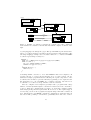
In <bigwig> we have introduced a domain-specific sub-language, called PowerForms, for form field validation [7]. It handles complex interdependencies between form fields, and the compiler generates the required code for both client
and server. By compiling into JavaScript, only the PowerForms implementors
need to know the details of how browsers support JavaScript, rather than all
Web service programmers. Also, the programmer does not need to write essentially the same code in a server-side version and a client-side version anymore.
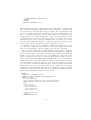
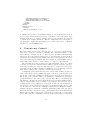
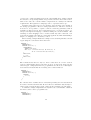
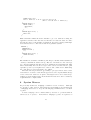
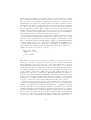
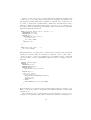
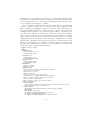
PowerForms is a declarative language. Informally, this means that the programmer specifies what the input requirements are, not how to check them. In
its simplest form, PowerForms allows regular-expression formats to be associated to form fields:
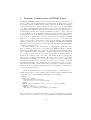
service {
format Digit = range(’0’,’9’);
format Alpha = union(range(’a’,’z’),range(’A’,’Z’));
format Word = concat(Alpha,star(union(Digit,Alpha)));
format Email = concat(Word,"@",Word,star(concat(".",Word)));
session Validate() {
html form = <html>
Please enter your email address:
<input name=email type=text size=20>
3 See e.g. http://www.webdevelopersjournal.com/articles/javascript
limitations.html or http://www.xs4all.nl/~ppk/js/version5.html.
21