1
CrossCore XA
Software User Guide
Date: Oct 25, 12
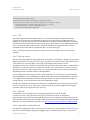
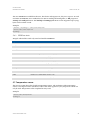
The user EEPROM is available for the user. The device node appears in /dev/user-eeprom. To read
and write an EEPROM, use a standard tool or API for reading and writing files, i.e. dd program or
write() and read() functions. The lseek() and mmap() functions are not supported. Up to 4095
bytes can be written or read.
Example:
~ # ech o “ my s tri n g” > /d e v/ user -ee pr o m
~ # ca t / de v/ user -ee pro m
my s t ri n g
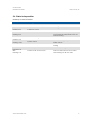
5.6.1. EEPROM data
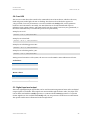
Integral value fields in read-only serial and module EEPROMs:
Keyword
PCB_SERIAL
UNIT_SERIAL
DATE
PROD_REV
HWVERSION
MAC1
DIGIO
CAN
USBDEV
USBHOST
SERIAL
CF
Value
Serial number of PCB board
Serial number of device, same as written on device brand label.
Manufacturing date
Product revision
Version of HW
MAC address of the Ethernet device
Number of digital I/O connectors (2/1/0)
Number of CAN channels (2/0)
Existence of USB Device port (1/0)
Existence of USB Host port (1/0)
Existence of Serial port connector (1/0)
Size of Internal CF-card (Gigabytes, 0/4/8)
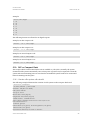
MOD_PCB_SERIAL
MOD_HWVERSION
WLAN
WLANMAC1
GPS
GSM
BLUETOOTH
Serial number of CrossCore XA All-Integrated module PCB
Version of CrossCore XA All-Integrated module HW
Existence of WLAN device (1/0)
MAC address of the WLAN device
Existence of GPS device (1/0)
Existence of GSM/GPRS device (1/0)
Existence of Bluetooth device (1/0)
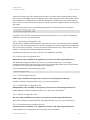
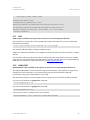
5.7. Temperature sensor
The CrossCore XA device has a built-in temperature sensor. The resolution of the temperature
sensor is one degree Celsius. The device node of the driver appears in /dev/tempsensor which can
only be read. Temperature value is updated at every read.
Example:
~ # ca t / de v/ t e mp sen so r
52 d eg C
www.crosscontrol.com
21