1
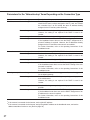
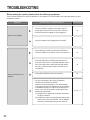
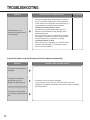
Symptom
Possible cause / Possible solution
Reference page
Cannot access from the
browser
• Is the same IP address assigned to other devices?
Are there contradictions between the address and
the network subnet to be accessed?
If the camera and the PC are connected in the
same subnet
Is the IP address of the camera and the PC set in a
common subnet?
Is "Use Proxy Server" for the setting of the browser
selected?
When accessing a camera in the same subnet,
entering the address of the camera in the "Don't Use
Proxy For These Addresses" box is recommended.
If the camera and the PC are connected in a
different subnet
Is the IP address of the default gateway set for the
camera correct?
–
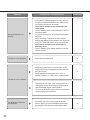
The picture is not displayed.
• Is the camera's power ON?
10
• Depending on the version of your browser, there
might be difficulties refreshing the picture and operating the camera.
Using Netscape Communicator 4.73, 4.78, or
Internet Explorer 5.5, 5.5SP2, 6.0 is recommended.
8
• Depending on the traffic of the network or the concentration of access to the camera, there might be
difficulties displaying the camera picture.
Click the reload button of the browser to request the
camera picture to be refreshed.
–
• The HTML files in the camera might be broken.
Refer to page 10 for the initialization of the files by
pressing the HTML document initialization switch.
10
The picture is not refreshed.
The HTML documents are
not displayed.
69