1
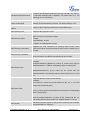
ACCOUNT PAGE DEFINITIONS
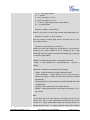
Account Active
Account Name
SIP Server
Secondary SIP Server
This field indicates whether the account is active. The default setting is
"Yes".
The name associated with the SIP account.
The URL or IP address, and port of the SIP server. This is provided by
your VoIP service provider (ITSP).
The URL or IP address, and port of the SIP server. This will be used
when the primary SIP server fails.
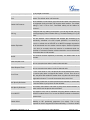
IP address or Domain name of the Primary Outbound Proxy, Media
Gateway, or Session Border Controller. It's used by the phone for
Outbound Proxy
Firewall or NAT penetration in different network environments. If a
symmetric NAT is detected, STUN will not work and ONLY an Outbound
Proxy can provide a solution.
User account information, provided by your VoIP service provider
SIP User ID
(ITSP). It's usually in the form of digits similar to phone number or
actually a phone number.
Authenticate ID
SIP service subscriber's Authenticate ID used for authentication. It can
be identical to or different from the SIP User ID.
The account password required for the phone to authenticate with the
Authenticate Password
ITSP (SIP) server before the account can be registered. After it is saved,
this will appear as hidden for security purpose.
Name
The SIP server subscriber's name (optional) that will be used for Caller
ID display.
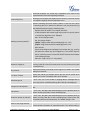
This parameter controls how the Search Appliance looks up IP
addresses for hostnames. There are four modes: A Record, SRV,
NATPTR/SRV, Use Configured IP. The default setting is "A Record". If
the user wishes to locate the server by DNS SRV, the user may select
DNS Mode
"SRV" or "NATPTR/SRV". If "Use Configured IP" is selected, please fill
in the three fields below:
•
Primary IP: The primary IP address where the phone sends DNS
query to;
•
Backup IP 1;
•
Backup IP 2.
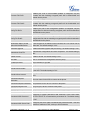
If the phone has an assigned PSTN telephone number, this field should
TEL URI
be set to "User=Phone". Then a "User=Phone" parameter will be
attached to the Request-Line and "TO" header in the SIP request to
indicate the E.164 number. If set to "Enable", "Tel:" will be used instead
FIRMWARE VERSION 1.0.4.13
GXP1400/GXP1405 USER MANUAL
Page 32 of 59