1
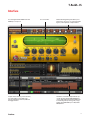
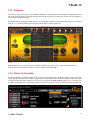
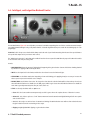
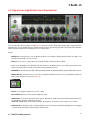
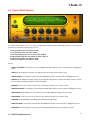
T-RackS CS ® • RELEASE: this control determines the amount of time it takes the compressor to bring the signal back to its uncompressed state after it has fallen below the threshold. Short release times will result in a more audible compression effect while longer ones (towards the extreme clockwise position) will result in a more natural compression and in increased sustain of several sources. • GAIN: this control sets the output level of the selected band. It can be used as a makeup gain to compensate for level loss after compression or to adjust the balance among the four bands. Adjustments of this control will be reflected by the “gain dot” on selected band and the shape of the horizontal white gain line. • SOLO: this button puts the selected band in solo mode to listen to its frequency range and gain reduction applied. • BYPASS: this control bypasses the compression for the selected band. • BANDS: this control lets you select the number of active bands the frequency spectrum will be divided into. • SLOPE: This control determines the steepness of the filters which will be used to split the frequency spectrum in bands. At its minimum (6dB/Oct) the slope of the filter is quite gentle and allows for more overlapping among the bands. At its maximum value (48 dB/Oct) the filter is more selective and separation among bands becomes sharper. • LINK BANDS: this button links the controls for all bands so that the values set for a selcted band will be mirrored on all of the other bands. This can be handy when all control must be set identical for all bands. The only exception is the gain control which can be still independently modified for each band by using the Gain Dot on the frequency display. • STEREO: this control links the two channels for stereo operation: all parameters affect the two channels in the same way to maintain a consistent stereo image. • MID/SIDE: this option uses a Mid-Side matrix to independently compress the Center or the Sides of your stereo program. Click MID to set the compression for the Center (Mid) of your stereo image or SIDE to set compression for the Sides. • RESET Switch: clicking on this control will reset all of the control to their initial default state. Clicking again after the reset will bring them back to the last setting they were left, in case you accidentally hit the reset button, or changed your mind. 4 - T-RackS CS module processors 62