1
Car multi1ncdia systcm
Car mu1ti1ncdia systcm
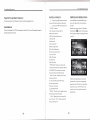
speciaI Car products features:
Fix pancl and connect with original car dircctly without changing tail wirc
InstalIatioⅡ
:
This unitis dcsigncd for12V DC(connCcting to other than12V unit will bc damagcd)nCgativc
ground operation systeln only
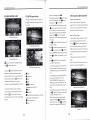
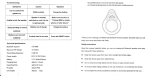
PANEL AND KEY
铲∵allswC"ng
POWER ON OPERATION:
Prcss PoⅤ 〃MUTEorPOWR/SRC
tclcpllonc(somC unit docs
button
not havc this fllnction button on thc pancl)
oncc to turn thc unit○ n Prcss and told to
∷ ● pov′ Cr on/off“ MlJTE” sound on/off
“
LOUD’ ’
∶Loudncss
turn OFF
VOL∶ dccrcasc Orincrcasc thc l/o1
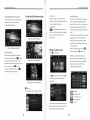
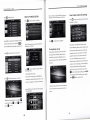
in dcfau1t,prcss鎏 盔 to cntcrinto homc pagc,
sEEK∶ Prcv and Ncxt
tota1t、 vo
AMs∶
scc bclo、 v∶
/廴
Rcmark∶ once turn on the unit,FM modcis
uto scan and'`uto storc
pages,changc by sliding the scrcen,
AM∶ Entcr AM
FM∶
Entcr FM
DⅤ D∶ Entcr DVD
RsT∶ Rcsctthc systcm
MIC∶ l/Iic for Bluc tooth
rcmotc controlrcccivcr
IR∶
AUX∶ Aux input
GPs∶ GPs sockct
sD∶
sD sockct
UsB∶ Usb sockct
“
’
PO、V/MUTE’ ∶sholt prcss Power ON,
13scconds cntcrinto FM,1ong prcssthis kcy
for PO、VER⊙ FF,undcrpowcr
on modc,
short prcss this key for Mute function
‘
‘
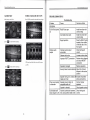
NA、/I” or“ GPS” ∶Under po、 vcr on lnodc,
short prcss this kcy
C1ick thc corresponding icon to enterthc
To cntcrinto GPS modcif GPs card is
dcsircd1nodc Notc∶ If no corrcsponding
inscrtcd,prcss again to
cquipmcnt(C g GPs card is notinscrted)or
Rcturn pcrvious modc
△ ∶Llcct D酞
signa1source(e g UsB orsD cardisnot
blltton
inscrtcd),you will not bc ablc to cntcrthc
“
MENlJ’ ∷Prcssthis kcy to changc between
dcs1rcd】 node
the1nain1ncnu and prcscnt mcnu
“
VOL+’ ’
∶
sholt prcss this to incrcasc Vol
up to391cvcls “VOL-” ∶
short prcss this to
dccrcasc ⅤoL up to0
03
04