1
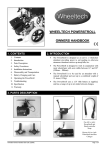
Parts Description
Handle Set
Lift Up Strap
Battery
2.
Bracket Installation
Install both brackets on the bottom
horizontal tubing of the wheelchair, using an
Allen Key.
Power Pack
Ensure that the screws are sufficiently tight
and do not rotate on the tubing.
Attach the two sections of Velcro together.
Installation Instructions
3.
1.
Handset Installation
Loosen both screws on the plastic brackets.
Attach the brackets around the push handle
tubing, and reattach screws to secure. Slide
the control panel on to the brackets.
Note: for user comfort, the control panel can
be mounted on the left or right hand side
push handle, with the panel inside or outside
the seating area.
PowerStroll S-Drive Owner’s Handbook
Page 3 of 8
Powerpack Installation
Feed the telescopic bar through the front
end of the powerpack. Loosen the tristar
knob on the bar and adjust to the correct
length.
Tighten the knobs on the bar and at the
front of the powerpack.
Place the two ends of the bar on the rear of
the brackets, then push the powerpack
forward until it locks in position.
Part Code: Z24001