1
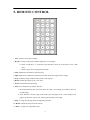
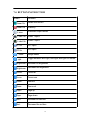
12. SXGA/XGA: Switch the output format between SXGA and XGA.
13. Blue+/-: Image color adjustment (blue).
14. PC 1/2: Switch the input between PC1 and PC2.
15. Video 1/2: Switch the input between Video1 and Video2.
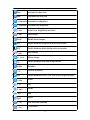
16. Menu Enter: a. Active the on-screen menu.
b. Display the selected image in Image Recall mode.
17. Arrow buttons:
a. Move the cursor when the on-screen menu is activated.
b. Navigate between image thumbnails in Image Recall mode.
18. USB: Switch the USB function between USB camera (capture the image from camera to PC
and USB storage (download image from camera to PC).
19. Zoom+/-: Image zoom in and zoom out control.
20. Auto: Carry out auto focus, color adjustment and white balance adjustment.
21. Focus+/-: Adjust focus manually, focus far and focus near.
22. Bright+/-: Image brightness adjustment.
6. CONNECTIONS
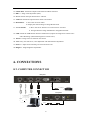
6.1. COMPUTER CONNECTION
Rear panel
To Audio Input
Side panel-1
To RGB Output
To PC Monitor
To Audio Output
To RS232
To USB
10