1
3.5
Synchronisation
The DaDplus can chase time code, and can lock its sample clocks to a variety of external reference sources. These are
selected on the Sync Menu.
3.5.1 The Chase Key
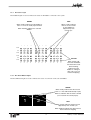
The Chase key is used to place a Dubber (or all Dubbers) in sync with time code. When in Chase Mode, a Dubber is
always ready to respond to time code entering its input port. When there is no time code entering the port, the
normal transport controls can be used to play, shuttle or jog a selected Dubber, but as soon as the time code starts,
the Dubber jumps immediately into sync, ignoring all further transport commands. When the Chase key is turned
off for a Dubber it ignores time code input and follows local transport commands.
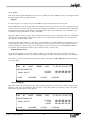
3.5.2 The Sync Menu
'$'1'7.7&
352-(&71$0(07
6<1&5$7(',63/$<-$06<1&02'(
:25'&/.1'7,0(&2'(2))6/2:
Sample Rate
Reference
Selection
Frame Rate
Selection
Time Code
Display
Selection
JAMSYNC
Mode
Selection
CHASE
Mode
Selection
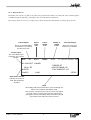
SYNC (Timing Reference Selection) - This soft key allows selection of the timing reference for the digital
master clock. Press to change the reference signal shown in the lower line, pressing enough times to cycle
around to the desired choice. Choices are - VIDEO, WORD-CLK (digital word clock). SUPR-CLK (256 X
sample rate clock) or INTERNAL (internal crystal sync).
RATE (Frame Rate Selection) - Press this soft key to change the "expected" frame rate and format for
incoming time code. It is possible to "pull up" or "pull down" the play speed of the machine by setting the
frame rate at say 29.97 but actually providing time code at 30 frames per second. (This causes a 0.1%
increase in sample rate). If the wrong frame rate is selected, the display will report “TIME CODE TRACKING”,
and will not run at the correct speed. The available choices for this menu are - MP24 Motion Picture 24 fps,
EB25 European Broadcast 25 fps, DF29 DropFrame 30 fps pull-down compensated, ND29 Non Drop Frame
30 fps pull-down compensated, DF30 Drop Frame 30 fps, or ND30 Non Drop Frame 30 fps.
DISPLAY (Time Display Format) - Selects the type of timing units displayed on the LCD menus. Press
repeatedly to cycle through: TIME CODE (time code in the format shown in the FRAMES field), FILM/35 (feet
and frames for 35 mm film) and FILM/16 (feet and frames for 16 mm film). This choice also affects slip values
when the SHIFT key is held down - for FILM, slip is in quarter frames (perforations), while for TIME CODE it is
in subframes.
JAMSYNC Mode Selection - This function allows the selection of a time range over which DaDplus will “jam”
sync to the timing reference in the temporary absence of time code. The options for this function are: OFF no jam sync, stop immediately time code stops; BRIEF- handle brief dropouts, fast response; NORMAL handle dropouts, moderate response; LONG - handle dropouts up to a second, delays transport stop; or
LONGER - handle exceptionally long dropouts.
CHASE Mode Selection - The DaDplus’ motion ballistics are selectable so that the speed of the Dubber can
be made to ramp from zero to playback and back to zero in line with projector movements on film stages.
The options are: TV - assume non-linear LTC which has no ballistics, FILM - assume ballistic LTC with
projector ballistics, FAST - same as FILM but with faster ballistics, SLOW - same as FILM but with slower
ballistics.
DaDplus User Manual
16