1
the CPro set for “Auto Detect” You may need to locate another monitor to perform this
action.
If that fails to work, you may need to look up the native display resolution and refresh
frequency for your monitor or device under test. Most HDTV devices support 720P 60
Hertz refresh rate at a minimum.
P: The device does not turn on, no Blue LED, no display on HD monitor even after
waiting two minutes.
S: Your AC power supply may not be supplying power. Check the cable and the AC wall
outlet to make sure that they are firmly plugged in and that the AC wall outlet is
supplying power. Alternately if you are attempting to power from a PC or other USB
port, you may not be providing enough power from the port to power the CPRo. Some
USB ports don’t provide enough current.
P: I’ve accidentally erased some test patterns/videos from the CPRo
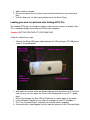
S: Backup files are available for restoring your CPro on the included CD ROM. See the
section on “Loading your own test patterns onto Calibug HDTV Pro” to restore
these. You may have to copy the files to your PC or a flash drive first.
Accessories
Most commonly available USB enabled I/O and storage accessories can be plugged
into the CPro USB “A” connector (the larger of the two) for use with it, these include:
•
•
•
•
•
•
USB wired mice
USB wireless mice
USB flash drive
USB hub (active powered hub only)
USB keyboard
USB CD ROM/DVD or portable hard drive (via active powered hub only due to
current requirements)
To use more than one USB device at a time, a powered USB hub is required.
The smaller Micro USB connector is only used for supplying power and connecting to a
PC. It cannot connect to the accessory devices listed above.
Service
Your CPro is warranted for 90 days from the date of sale.
Should your CPro device need service, please contact: