1
background information, including a general
description of how the two types of tool work, with
reference to two specific tools – ParaConc and
Trados – that are representative of the categories of
BC and TM respectively. Part 3 contains a brief
assessment of the place occupied by these tools
within the translation industry today. Part 4
contains a more detailed comparative analysis of
the features and associated advantages and
disadvantages of each type of tool. Finally, Part 5
concludes with some general recommendations
about which translation situations warrant the use
of each type of tool.
2
General introduction to BCs and TMs
The general aim of both a BC and a TM is to
allow a translator to consult, and if appropriate to
“reuse”, relevant sections of previously translated
texts. In the following sections, BCs and TMs will
be described with reference to ParaConc and
Trados, which are representative examples of these
respective categories of tool.
2.1
ParaConc: an example of a BC2
BCs, such as P a r a C o n c , are fairly
straightforward tools: they allow translators to
search through bilingual parallel corpora to find
information that might help them to complete a
new translation. For example, if a translator
encounters a word or expression that he does not
know how to translate, he can look in the bilingual
parallel corpus to see if this expression has been
used before, and if so, how it was dealt with.
To use ParaConc, the source and target texts
must first be aligned, which means that
corresponding text segments are linked together3.
A semi-automatic alignment utility is included in
the program to prepare texts that are not already
pre-aligned. The initial part of the alignment
process is carried out in three stages: first the texts
are aligned based on headings, if any are present in
the texts, then alignment is carried out at the
paragraph level, and finally at the sentence level.
The software uses the formatting information in
files to carry out alignment of headings and
2
paragraphs. Alignment at the sentence level is
achieved by applying the Gale-Church algorithm
(Gale and Church 1993). To make adjustments to
the alignment, the user can examine the aligned
segments and either merge or split particular
segments, as necessary. One important thing to
note is that the aligned units remain situated within
the larger surrounding text.
Once the texts are aligned, the translator can
consult the corpus. By choosing the basic search
command, the translator can retrieve all examples
of a word or phrase (or part of a word) from the
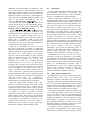
corpus. As shown in Figure 1, the search term
“head” has been entered and all instances of
“head” from the English corpus are displayed in
the upper pane (here in a KWIC format). The
corresponding text segments from the French
corpus are shown in the lower pane.
In fact, ParaConc could more properly be termed a
multilingual concordancer, since it is possible to consult
texts in up to four languages at once. However, in the
context of this paper, we will refer to it as a BC and
discuss its use for comparing texts in two languages.
3 A detailed description of alignment techniques is
beyond the scope of this paper; however, alignment is a
non-trivial matter. Problems can arise, for example, if a
single source text sentence has been translated by
multiple target language sentences, or vice versa, or if
information has been omitted from or added to the
target text (e.g. to handle cultural references).
Figure 1. A ParaConc results window.
The concordance lines can be sorted in various
ways (e.g., primarily 1st left and secondarily 1st
right) in order to group similar phrases together
and therefore make it easier for a translator to spot
linguistic patterns. Clicking on a concordance line
in the upper pane will highlight that line and also
the corresponding text segment in the lower pane.
Double-clicking on a line will bring up a window
containing the segment within a larger context.
Suggested translations for the English “head”
can be highlighted by positioning the cursor in the
lower French results pane and clicking on the right
mouse button. A possible translation of “head”