1
Remote Control
Function
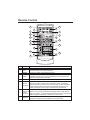
Ref # Button
23
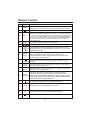
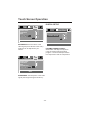
This button is used to confirm selections and settings within many
ENTER of the menus in the OSD system.
In DISC mode, press it to reverse rapidly
24
Use to input numerical values during programming, with the GOTO
button, or to directly select a track to play .
In Radio mode, (when the RDS engaged,), 0 serves as TA function,
9 serves as the AF function .
25
0-9
26
+10
This button is used with the other number buttons for use with
two-digit number entries.
27
1-6
Six numbered preset buttons store and recall stations for each band
Preparing the Remote Control
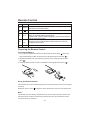
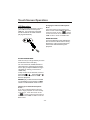
Inserting the Battery
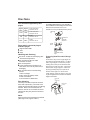
1.First push to inside as the direction indicated by the arrow (See 1 )And then
Remove the battery holder as the direction indicated by the arrow (See 2 ).
2.Replace the battery Set a new battery property with (+)side up as illustrated
(See 3 ).
3.Insert the battery holder. Push in the holder to the original position(See 4 ).
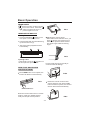
Using the Remote Control
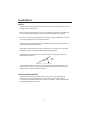
Face the remote control towards the player front face IR mark (remote control signal
receiver).
Operation angle: About
30 degree in each the direction of the front of the IR mark.
Note :
The lithium cell in the battery compartment of remote control has been secured for
transport with a foil . Before initial use please remove this foil so that the remote
control is ready for operation .
-12-