1
1
Getting started
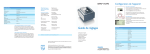
Device navigation
How to start therapy
1
0
5
S/T AVAPS: 0.5
A
S/T AVAPS: 0.5
10
15
20
cm
H2 O
25
12/30/2010
12/30/2010
06:12 PM
06:12 PM
5
1
Humidifier
Menu
A
Setup
30
Menu
Ramp
Therapy
6
2
3
4
1 Display screen
2 Perform action specified on-screen
(humidifier setting, cancel action
or exit menu)
3 Navigate menus or change settings
4 Perform action specified on-screen
(activate ramp, select/modify/
confirm parameters)
5 Audio pause button
6 Start/stop button
•Connect the
device to AC
or DC power
source, or
use detachable
battery module
•Press
device
to switch on the
•Select
the treatment
to start