1
THE DISPLAY
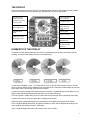
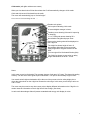
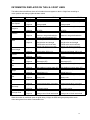
The C3 has a multi-function LCD screen. This diagram shows the layout of the display and all possible
elements. Note that only certain elements are illuminated at one time as appropriate.
Circular vario in
climb mode and
speed to fly director
in cruise mode
Glide path arrows
above glide slope
Selected cursor
point
Glide path arrows
below glide slope
Vario climb mode
circle indicator
Tendency arrows
Averager in climb
mode, netto (air
mass) in cruise
mode
Cursor points
Battery warning
4 segment display of
altimeter line
5 Segment display
of chosen cursor
position
ELEMENTS OF THE DISPLAY
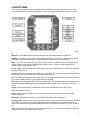
In vario the circular display shows the vario value. A petal displayed in the upper half means you are
climbing, and a lower half display means you are descending.
In vario mode it displays a vario -- At a climb rate of 5 m/s (10 kts) all the arrows are visible; at a climb
above 10 kts the arrows start to disappear from the middle up to a maximum of 20kts where only the last
arrow stays visible. Descending is the reverse procedure.
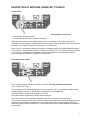
In speed to fly mode it displays an optical speed to fly indicator -- Upward pointing arrows when you are
flying too fast and downward pointing arrows when you are flying too slowly.
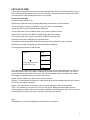
The circle symbol is visible when you are in vario mode and an average value is displayed numerically.
In speed to fly mode a netto (air-mass) value is displayed numerically.
When the supply voltage falls below the preset danger level the battery warning becomes visible.
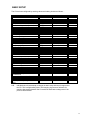
In the 4 segment display the altitude, final glide information or other data is displayed according to the
cursor position and setting of switch 3. (See table)
In the 5 segment display the value of the chosen cursor item is shown.
2