1
Easy Use & Easy Maintenance
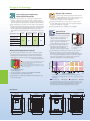
Integrated Tray Catches minimize cleaning time
while LCD Panel enhances operation
Integrated Tray Catches
Tray catches are integral parts of the chamber, opening
up more space for trays, allowing the incubator to
accommodate more culture containers.
(Comparison with MCO-20AIC/MCO-19AIC)
Top Screen
Responds to gloved
finger action.
LCD Touch Panel Controller
A WVGA color LCD touch panel delivers full
control over different protocols. Control can
be performed with gloved fingers as the controller is
equipped with a resistive touchscreen.
MCO-170AIC’
s/
MCO-230AIC’
s interior
components
MCO-170AIC’
s/MCO-230AIC’
s
tray catches
(integral part of the chamber)
MCO-170AIC’
s Tray
MCO-230AIC’
s Tray
Internal dimensions
Internal dimensions
475(W) x 450(D)mm
620(W) x 450(D)mm
USB Memory Data Transfer
Standard USB port provides convenient log data
transfer to a USB memory stick and to a PC. Data log
period is 1.5 months using 2-minute intervals.
Up to 20 ø100mm dishes (92mm) can
be arrayed (5 horizontally x 4 vertically)
*In-house comparison
16 dishes (MCO-19AIC)
→ 20 dishes (MCO-170AIC)
Up to 24 ø100mm dishes (92mm) can
be arrayed (6 horizontally x 4 vertically)
*In-house comparison
20 dishes (MCO-20AIC)
→ 24 dishes (MCO-230AIC)
Optimal Humidity Control
USB port
Log screen example (CO2 level)
Note: It is impossible to use a USB memory device which
is password-protected.
Stable humidity control not
influenced by environmental
conditions and frequent incubator
door openings.
Humidity
control bar
Japan and US patents pending
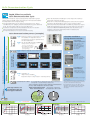
Security
Automatic door lock (electric lock) can be set on the
MCO-170AICUVH (standard equipped) and other
models equipped with the optional electric lock
(MCO-170EL).
•Control Panel with single‒user Key Lock
(MCO-170AIC/MCO-230AIC)
•Addition of user ID function for better traceablilty
(able to register up to 99 user-IDs and passwords)
(MCO-230AIC)
MCO-170AIC
•Multiple detailed activity logs exported to individual
CSV files.
MCO-230AIC
The Auto-Lock set up screen
User
Access log
Password input window
*For MCO-170AIC, a password is required to unlock the Auto-Lock when the
Key Lock is set.