1
DVXI/XV KVM-EXTENDER
3. Installation
For first-time users, we recommend that you carry out a test placement, confined to a single
room, before commencing full installation. This will allow you to identify and solve any
cabling problems, and experiment with the KVM extender system more conveniently.
3.1 Package Contents
You should receive the following items in your extender package (all types):
•
DVXi/XV KVM-Extender- pair (Local Unit + Remote Unit)
•
2x 5V DC universal power supply for the DVXi/XV - Extender
•
2x German type power cord
•
User manual (Quick Setup)
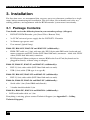
K464-1W, K464-2W, K465-1W and K465-2W (additionally):
•
KVM CPU cable set (1.8m) with one side: PS/2 (6-pin mini-DIN male) keyboard and
mouse connector and DVI-I video (DVI-I dual link male) connector – other side: DVI-I
video (DVI-I dual link male) connector
•
PS2-Keyboard-/ Mouse adapter to connect K/M to the Local Unit (keyboard can be
plugged in directly, without using an adapter)
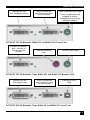
K464-1U, K464-2U, K465-1U and K465-2U (additionally):
•
DVI-I (1,8m) video cable (DVI-I dual link male-to-male)
•
USB (1,8m) cable (USB type A to type B)
K464-2W, K464-2U, K465-2W and K465-2U (additionally):
DVI-I (1,8m) video cable (DVI-I dual link male-to-male)
•
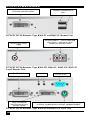
K464-SA, K464-SU, K465-SA and K465-SU (additionally):
•
Serial cable 1,8m (Serial DB9-male/female)
•
2 Audio Anschlusskabel 1,8m
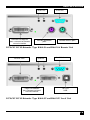
K464-DA, K464-DU, K465-SA and K465-DA (additionally):
•
DVI/serial/audio cable set 1,8m
If anything is missing, please contact Technical Support (see Appendix F – Calling
Technical Support).
14