1
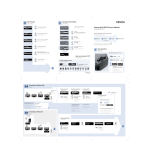
Turnitin Instructor Quickstart Step 2 On your homepage, you will see the class you created using the class setup wizard. If you want to create another class or if you did not use the class setup wizard, click the add a class link . ! If you do not want to create a new class at this time, skip ahead to the next step. Adds a new class to your account On the class creation page, enter a class name and an enrollment password . Enter a class name and enrollment password The enrollment password is the password your students will use to enroll in your class. Pick a password that is easy for your students to remember and that contains all lowercase letters. The end date is the date your class expires. When a class expires students can no longer submit papers or enroll in the class. The default duration for all classes is 6 months. If you want your class to last longer or shorter, you can change the end date. If you want to let students enrolled in your class view their own Originality Reports, select yes using the pulldown. By default, students do not have access to their own reports. Click submit to add the class to your homepage. 2