1
Table of Contents
1 Introduction ...................................................................... 1
1.1 Topics Covered ............................................................... 2
1.2 Necessary components .................................................... 2
2 Step by step installation of the Raspberry-Pi ..................... 3
2.1 Installation of Raspian
(Debian Linux for Raspberry-Pi)
...................... 3
2.2 Basic configuration via “raspi-config”................................. 3
2.3 Software and Firmware update ......................................... 4
2.4 Connecting Raspberry-Pi and the EnOcean-Pi ..................... 4
2.5 Discover the IP address of your Raspberry-Pi ..................... 5
2.6 Remote control of your Raspberry-Pi ................................. 5
2.6.1 Setting up PuTTY ................................................... 5
2.7 Installation of the building automation server ..................... 6
2.7.1 Installation of the Perl environment including libraries
for FHEM .................................................................. 7
2.7.2 Installation FHEM .................................................. 7
2.7.3 Display of the FHEM Web Interface .......................... 7
2.7.4 Configuring the FHEM Server .................................. 8
2.7.5 Configure the EnOcean-Pi:...................................... 8
2.7.6 Configure the PTM switch: ...................................... 8
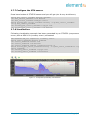
2.7.7 Configure the STM sensor: ..................................... 9
2.7.8 Visualization: ........................................................ 9
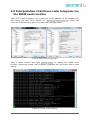
2.8 Interpretation of EnOcean radio telegrams via the FHEM ........
event monitor ..................................................................... 10
Appendix 1: Useful Links .................................................... 11
1.1 EnOcean radio modules: ................................................. 11