1
Image enhancement
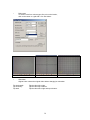
Image enhancement:
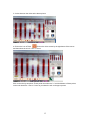
Auto level:
Manual mode:
Auto mode on right:
Auto mode on left:
Auto mode on both:
adjust the range of image input on the population bar chart.
use the button on the sides of the bar chart to change adjustment levels.
adjust the levels on the right side automatically.
adjust the levels on the left side automatically.
adjust the levels on both sides automatically.
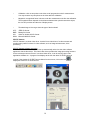
The color of video is much vivid in manual mode. The video processing function in auto mode
may change the color of the video.
Change the color by hue value.
Control the LED light in the microscope camera. Click on the button to turn on or
off the LED lights.
The light bar chart of the video. It shows the profile of the lights in the video. You
may change the left and right limitation of the bar chart to enhance the
appearance of the video. The purpose of this function is to place the lighting of
the video evenly over the bar chart and the result will display the video in more
clear way.
Focus gauge: an indicator to show the focus clearness in numbers. The higher value in the gauge
means the video is much clear by the focus position.
20