1
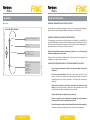
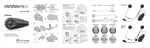
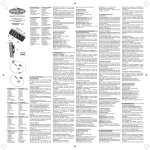
1.3 Box contents
2 – Getting Started
B
A
C
6
2
8
4
D
E
1
F
3
7
5
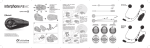
Pic.2
H
(1)
(2)
(3)
(4)
(5)
(6)
(7)
(8)
G
J
GUIDA RAPIDA IT
I
SI CONSIGLIA DI VERIFICARE LA PRESENZA
DI AGGIORNAMENTI SOFTWARE SUL SITO
WWW.INTERPHONE.COM
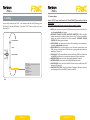
MFB button
UP button
DOWN button
Volume + button
Volume - button
Blue led
Red/Green/Orange led
Connector
www.interphone.com
Pic.1
A.
B.
C.
D.
E.
Bluetooth® unit
Microphone for full face helmet
Microphone for Jet/flip up helmet
Left speaker
Right speaker
2.1 Main Commands (Pic.2)
F.Velcro set for speaker/mic + spare POP
wind protection
G. Fixing plates + screwdriver
H. USB charging cable
I. USB data cable
J. Quick guide
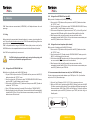
Please refer to quick guide for installing F3MC on your helmet, provided in the box (can
be also downloaded from Interphone website), otherwise you can also check video
TUTORIAL on website www.interphone.com.
ENGLISH - 5
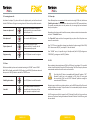
Power on
Press MFB button (1), led (6) flashes.
Power off
Press and hold MFB button (1) until you hear “Interphone powering
down” message. Led (7) flashes red for few seconds.
Volume
Press buttons (4) to increase or (5) to decrease.
Mute
Press button (5) for about 2 seconds.
Menu
Press buttons (2) or (3) to scroll the menu items. Press MFB button
(1) to select an item. Once selected a menu item, you come back to
“INTERCOM” menu (Standby)with a short press of MFB button.
ENGLISH - 6