1
RG-MTP58B User Manual
content
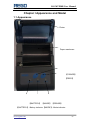
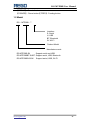
Precautions ..................................................................................................- 5 Safety Precautions ................................................................................- 5 Operation Precautions ..........................................................................- 5 Storage Precautions .............................................................................- 6 Chapter I Appearance and Model ................................................................- 7 1.1 Appearance ....................................................................................- 7 1.2 Model ..............................................................................................- 8 Chapter II Features ......................................................................................- 9 2.1 Print Performance ...........................................................................- 9 2.2 Power Supply..................................................................................- 9 2.3 Interface ..........................................................................................- 9 2.4 Physical Parameters .......................................................................- 9 2.5 Environmental Parameters .............................................................- 9 2.6 Others ........................................................................................... - 10 Chapter III Operation Method .................................................................... - 10 3.1 Preparation Before Use ................................................................ - 10 3.1.1 Battery Installation .............................................................. - 10 3.1.2 Loading Paper Roll ............................................................. - 10 3.2 Basic Function Operation.............................................................. - 11 3.2.1 Power On ............................................................................ - 11 3.2.2 Power Off ............................................................................ - 11 3.2.3 Feeding Paper (Feeding manually) ..................................... - 11 3.2.4 Self-Test ............................................................................. - 11 3.2.5 Hex Printing ........................................................................ - 11 3.2.6 Enter The Program Upgrade Mode..................................... - 12 3.2.7 Power Charging .................................................................. - 12 3.3 Printer Parameter Settings............................................................ - 13 3.4 Printer Connection and Print ......................................................... - 13 3.4.1 USB Connection ................................................................. - 13 3.4.2 Serial Connection ............................................................... - 13 3.4.3 Bluetooth Connection ......................................................... - 15 3.4.4 WI-FI Connection ................................................................ - 15 3.5 Indicator Light and Buzzer Description ......................................... - 16 Chapter IV Other Settings .......................................................................... - 18 4.1 Programming Command Manual .................................................. - 18 4.2 Pre-printed Black Mark Description .............................................. - 18 Chapter V WI-FI Wireless Module.............................................................. - 20 Setting and User guide .............................................................................. - 20 5.1 Web Management Page Description ............................................ - 20 5.1.1 Open Management Page .................................................... - 20 5.1.2 System Information Page ................................................... - 21 Pic. 5-2 System information page ................................................ - 21 -
www.regotek.com
-3-