1
Digital Video Recorder User Manual
Table of Contents
1
Introduction......................................................................................................................................................................... 1
1.1 DVR Introduction ............................................................................................................................................................................................... 1
1.2 Main Features.................................................................................................................................................................................................... 1
2
Hardware Installation ......................................................................................................................................................... 4
2.1 Install Hard Drive ............................................................................................................................................................................................... 4
2.1.1 Install Hard Drive ..................................................................................................................................................................................... 4
2.2 Front Panel Instructions ..................................................................................................................................................................................... 5
2.3 Rear Panel Instructions ...................................................................................................................................................................................... 6
2.3.1 Rear Panel Interface ................................................................................................................................................................................ 6
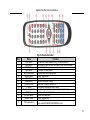
2.4 Remote Controller.............................................................................................................................................................................................. 9
2.5 Control with Mouse ........................................................................................................................................................................................... 11
2.5.1 Connect Mouse....................................................................................................................................................................................... 11
2.5.2 Use Mouse.............................................................................................................................................................................................. 11
3
Basic Function Instruction .............................................................................................................................................. 13
3.1 Power On/Off....................................................................................................................................................................................................13
3.1.1 Power on ................................................................................................................................................................................................13
3.1.2 Power off ................................................................................................................................................................................................13
3.2 Login ................................................................................................................................................................................................................14
3.3 Live preview .....................................................................................................................................................................................................14
3.3.1 Live playback ..........................................................................................................................................................................................15
4
Main menu setup guide .................................................................................................................................................... 16
4.1 Basic configuration ...........................................................................................................................................................................................17
4.1.1 System ...................................................................................................................................................................................................17