1
profile
myprofile
profile
my
MyProfile
Profile
3.3.My
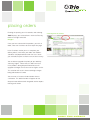
The first time you enter e-volve you should
The first time you enter e-volve you select ‘My Profile’
The
first
you to
enter
e-volve
youdetails
should select
select
‘Mytime
Profile’
check
all your
to check all your details have been recorded correctly.
‘My
to check correctly.
all your details
have been
haveProfile’
been recorded
This ensures
This ensures you will receive the correct notifications.
recorded
correctly.
This ensures
you willas
receive
you will receive
the correct
notifications,
the correct notifications.
well as allows you to update your password
Selecting Yes to ‘Email for Req. Status’ will prompt
to one that
mayyou
be easier
to remember.
the system
to send
an email
each time your order
Selecting Yes to ‘Email for Req. Status’ will
progresses to the next stage, for example; picking slip
prompt
the
system
to send
you Status’
an email
Selecting
Yes
tobeing
‘Email
for Req.
willeach
spooling,
currently
picked,
despatched.
The
time
your
progresses
to the
stage, for
prompt
theorder
system
to send
you
an next
email
default
setting
for
this option
is ‘No’
due
to theeach
number
example;
packing
slip
spooling,
currently
being
timeupdates
your order
to the next stage,
of email
youprogresses
may receive.
picked, despatched. The default setting for this
for example; picking slip spooling, currently
option is set to ‘No’ due to the number of email
beingYes
picked,
despatched.
default
settingthe
Selecting
to ‘Keep
ShoppingThe
Cart?’
will allow
updates you may receive.
system
to record
orders
forthe
future
reference.
for this
optionyour
is No
due to
number
of
Image
3 updates you may receive.
email
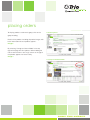
Selecting Yes to ‘Keep Shopping Cart?’ will allow
the system to record your orders for future
Selecting Yes to ‘Keep Shopping Cart?’ will
reference.
allow the system to record your orders for
Image 3
future reference. Image 3
SOURCE. STORE. DISTRIBUTE.