1
Table of Contents
Safety .................................................................................................................................. 1
1. Getting started ................................................................................................................ 2
1.1. Setting up the Asema E ........................................................................................ 2
1.1.1. Mounting the device on the table or the wall .............................................. 2
1.1.2. Connecting the power ................................................................................ 2
1.1.3. Running the Startup Wizard ........................................................................ 3
1.1.4. Using and switching between the E-view and Main Setup ............................ 4
1.2. Basic Settings ....................................................................................................... 5
1.2.1. Language ................................................................................................... 5
1.2.2. Date and Time ........................................................................................... 5
1.2.3. Connecting to the Internet ......................................................................... 5
1.2.4. Adding controllers and connecting to appliances .......................................... 6
1.2.5. Managing screenlets ................................................................................... 6
2. User interface .................................................................................................................. 8
2.1. Device buttons ...................................................................................................... 8
2.2. Sensors ................................................................................................................ 8
2.2.1. Proximity ................................................................................................... 8
2.2.2. Gestures .................................................................................................... 9
2.3. LEDs ..................................................................................................................... 9
2.4. Touchscreen .......................................................................................................... 9
2.4.1. Interface elements ..................................................................................... 9
2.5. WebView ............................................................................................................ 11
2.5.1. Accessing the WebView ........................................................................... 11
2.5.2. Using the WebView .................................................................................. 11
2.5.3. Using the Mobile View ............................................................................. 12
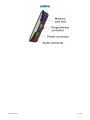
2.6. Connectors ......................................................................................................... 12
3. Automating your home .................................................................................................. 14
3.1. Devices and appliances you can use for automation ............................................. 14
3.1.1. Appliance controllers ................................................................................ 14
3.1.2. Central electricity meters .......................................................................... 14
3.1.3. Remote controls and wireless buttons ...................................................... 15
3.1.4. Motion detectors and other sensors ......................................................... 15
3.1.5. Weather stations ...................................................................................... 15
3.2. Home and Away ................................................................................................. 15
3.3. Scheduling appliances ......................................................................................... 16
3.4. Tariff controls ..................................................................................................... 16
3.5. Standby power control ........................................................................................ 16
3.6. Advanced automation ......................................................................................... 17
3.6.1. Appliance Groups ..................................................................................... 17
3.6.2. Themes .................................................................................................... 17
3.6.3. Multi-step sequences ................................................................................ 17
4. Saving energy and optimizing electricity use ................................................................... 18
4.1. Your electricity contract ....................................................................................... 18
4.2. Price preferences ................................................................................................ 18
5. Remote controlling your home ....................................................................................... 19
5.1. Setting up a user account ................................................................................... 19
5.1.1. Setting up a user account on the device ................................................... 19
5.1.2. Setting up a user account in the WebView ................................................ 19
5.2. Home firewall ..................................................................................................... 20
5.3. Accessing your home remotely with a smartphone ............................................... 20
6. System setup ................................................................................................................ 22
6.1. Screenlets ........................................................................................................... 22
6.1.1. Settings ................................................................................................... 22
6.1.2. Installing Screenlets ................................................................................. 22
6.1.3. Updating Screenlets ................................................................................. 23
Asema E
iii / 49