1
◐ CAMERA / STRUCTURE SPECIFICATION
Model No.
SK-D300IR/HT22AI
Image Device
SK-D300IR(D)/HT22AI
1/2.7" 2.1Megapixel CMOS Sensor
Scanning System
Progressive Scan
Active Pixel
1930(H) x 1088(V) Pixel
S/N Ratio
39.9dB or More
2. OSD menu structure
Function
setting menu
1.
VIDEO
OUT
Sub menu
Summary
Set the Motion mode. (OFF/ON)
RETURN
More back to previous menu.
SENSITI.
Set the Sensitivity mode.
ALARM
Set the Sensitivity mode. (OFF/TRACE/
ICON)
HOLD TIME
Set the Sensitivity mode. (1~10)
HLC
Set the HLC mode. (OFF/ON)
MODE
Video Output Level
HD-TVI / 1.0VP-P(75Ω, Composite),
NTSC/PAL
Set the Day & Night mode.
(AUTO/EXT/COLOR/BW)
D TO N
Set the brightness of illumination about changeing the
day → night mode by CDS sensor.
2.
N TO D
DAY/NIGHT
Set the brightness of illumination about changeing the
night → day mode by CDS sensor.
Shutter Speed
Auto / 1/25~1/10000
White Balance
AUTO / USER / PUSH / 8000K ~3200K / HOLD
Backlight
ON / OFF
HLC
ON / OFF
AGC
ON / OFF
Day & Night
AUTO(ICR)
2DNR
AUTO
Privacy Zone
ON / OFF(2 Zone Selectable)
Motion Detection
ON / OFF(1 Zone Selectable)
Mirror
3.
AWB
OFF / H / V / HV
IR Led
IR LED 24pcs
Lens
Vari focal lens
Power Supply
Regulated 12V DC+/-10% 12V DC/24V AC Dual voltage
Current Consumption
Max. 300mA (at 12V DC)
Operation Temp.
-45℃ ~ 50℃
Dimension
Ø130.8 x 101(H) mm
Weight
Approx. 500g
4.
AE
◐ FUNCTION SETTING
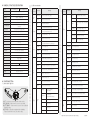
1. How to use the jog lever
EX
TVI
DE
O
RETURN
More back to previous menu.
MODE
Set the AWB mode.
(AUTO/USER/PUSH/8000K~3200K/HOLD)
RETURN
More back to previous menu.
R-G GAIN
Adjust R-G gain value.
COLOR GAIN
Set the Color gain mode.
B-G GAIN
Adjust B-G gain value.
COLOR HUE
Set the Color hue gain mode.
RETURN
More back to previous menu.
SHARPNESS
Set the Sharpness mode.
MODE
Set the AE mode. (ESC/DC/HOLD)
CONTRAST
Set the Cotrast mode.
BRIGHT OFF
Set the Bright off mode.
1
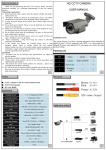
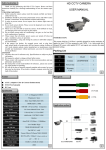
①SET : Used to access the menu and confirm selection.
②UP, ③DOWN : Used to move the cursor to up or down.
④LEFT, ⑤RIGHT : Used to move the cursor to left or right and
change the value.
⑥EXT-VIDEO : Extra video output terminal for installation.
Plug your test monitor in hear. The cable is option.
MASK VALUE Set the Mask value mode.
THRESHOLD
6.
EFFECT
Set the Threshold mode.
set the Bright with manual iris lens.
SHUTTER
Set the Shutter mode. (AUTO, 1/25~1/10000)
MIRROR
Set the Mirror mode. (OFF/ON)
FLICKER
Set the Flicker mode. (OFF/50HZ/60HZ)
FLIP
Set the Flip mode. (OFF/ON)
BLC
Set the BLC mode. (0~16)
RETURN
More back to previous menu.
AGC
Set the AGC mode. (1~5)
CAMERA ID
Set the Camera ID mode.
LSC
Set the LSC mode. (OFF/ON)
ID DISP.
Set the ID display mode. (OFF/ON)
RETURN
More back to previous menu.
NAME DISP.
Set the Name display mode. (OFF/ON)
LANGUAGE
Set the language. (ENGLISH/CHINESE)
MASK PAT.
5.
SPECIAL
HLC
BRIGHT
5
3
5.
SPECIAL
Set the duration time. (1~60)
AREA SEL.
4
MOTION
DELAY TIME
2
6
Summary
MOTION
HD-TVI 1080P(1920 x 1080) 30fps/25fps
0 Lux(LED ON), 0.5Lux(LED OFF)
Sub menu
FRAME RATE Set the NTSC 30fps or PAL 25fps.
Video Output Mode
Min. Illumination
Function
setting menu
PRIVACY
ZONE
Set the Area number.
(AREA1/AREA2)
7.
SYSTEM
FACTORY INIT Reset your camera to factory default condition.
Set the Mask pat.
(OFF/BLACK/GRAY/WHITE)
SX
Set the Start-X.
EX
Set the End-X.
SY
Set the Start-Y.
EY
Set the End-Y.
8.
EXIT
RETURN
More back to previous menu.
SAVE/EXIT
Save the value and exit menu.
EXIT
Exit the OSD menu.
RETURN
More back to previous menu.
※All specification is subject to change without notice to improve the quality.
3B26596A