1
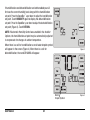
Thermostat TouchPadsTM
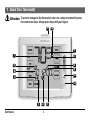
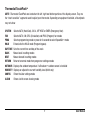
NOTE: Thermostat TouchPads are located on the left, right and bottom portions of the display screen. They are
the “touch sensitive” segments used to adjust your thermostat. Depending on equipment installed, all touchpads
may not show.
SYSTEM
FAN
PROG
HOLD
DAY/TIME
BACK
NEXT
RETURN
OUTDOOR
HUMIDITY
CONFIG CLEAN
Selects AUTO (Heat/Cool), COOL, OFF HEAT or EMER (Emergency Heat)
Selects AUTO, ON, CIRC (Circulation) and PROG (Program) fan modes
Selects programming mode or press for 3 seconds to select SpeedSet™ mode
Enters/exits the HOLD mode (Program bypass)
Sets the current time and day of the week
Moves back in setting modes
Moves forward in setting modes
Returns to normal mode from program or settings modes
Displays the outdoor temperature if a Braeburn™ outdoor sensor is installed
Displays or adjusts the current humidity level (6400 only)
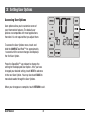
Enters the User settings mode
Enters a brief screen cleaning mode
7
User Manual