1
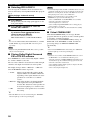
TROUBLESHOOTING
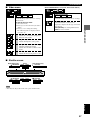
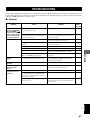
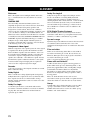
■ Tuner
Problem
FM/
AM
FM
AM
Cause
Remedy
Refer
to page
The preset stations are cleared.
Pre-set the stations once again.
55
FM stereo reception is
noisy.
The characteristics of FM stereo
broadcasts may cause this problem
when the transmitter is too far away or
the antenna input is poor.
Check the antenna connections.
Try using a high-quality directional FM
antenna.
16
Use the manual tuning method.
54
There is distortion, and
clear reception cannot
be obtained even with a
good FM antenna.
There is multipath interference.
Adjust the antenna position to eliminate
multipath interference.
16
The desired station
cannot be tuned in with
the automatic tuning
method.
The station is too weak.
Use a high-quality directional FM antenna.
16
Use the manual tuning method.
54
The desired station
cannot be tuned in with
the automatic tuning
method.
The signal is weak or the antenna
connections are loose.
Tighten the AM loop antenna connections
and orient it for best reception.
16
Use the manual tuning method.
54
There are continuous
crackling and hissing
noises.
Noises result from lightning,
fluorescent lamps, motors, thermostats
and other electrical equipment.
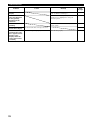
Use an outdoor antenna and a ground wire.
This will help somewhat, but it is difficult to
eliminate all noise.
16
There are buzzing and
whining noises
(especially in the
evening).
A TV set is being used nearby.
Move this unit away from the TV.
—
APPENDIX
Previously preset
stations cannot be
tuned in.
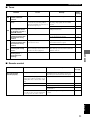
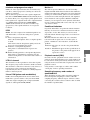
■ Remote control
Problem
The remote control
does not work nor
function properly.
Cause
Remedy
Refer
to page
Wrong distance or angle.
The remote control will function within a
maximum range of 6 m (20 feet) and no more
than 30 degrees off-axis from the front panel.
7
Direct sunlight or lighting (from an
inverter type of fluorescent lamp, etc.) is
striking the remote control sensor of this
unit.
Reposition this unit.
—
The batteries are weak.
Replace all batteries with new ones.
3
The manufacture code is not correctly
set.
Set the code correctly.
57
Try setting another code of the same
manufacturer.
57
Even if the manufacturer code is
correctly set, there are some models that
do not respond to the remote control.
Operate the component using its remote
control.
—
English
71