1
ROGER s.c.
DIAL 1602 v1.0 25/11/1999
CONNECTION OF THE PGM OUTPUT
Note !
The captions in the following part of the text in "[ ]" brackets are
also messages which are displayed on the dialer display at various
stages of its use and operation.
test the RAM memory. If the dialer programming has been lost, the
[First start of dialer] message is displayed, and then [DIALER
PROGRAMMING LOST !] / [ ENTER DEFAULT CODE]. Then
you should press the [#] key and after message [Enter code] is
displayed, you should enter the default installer code, i.e. 1234;
end the code entry with the [#] key. The dialer will go to the
programming code. If after switching on, the power supply the
RAM test is successful, the message [Dialer Restart] will be
displayed and the device will switch to the ready mode. The
pulsing display signalizes a necessity of programming the time and
date. After a restart, despite resetting the time and date, the RAM
memory is not reset and the dialer monitors the alarm inputs and is
ready to handle the alarm in the A or B line.
DIALER CODES
DIALER OPERATING MODES
The dialer has four codes. Each of the codes, except for the
duress code, can include up to 6 digits. A code can be
programmed as a blank one, then after a request [Enter code] you
should only press the [#] key. The codes are also used for
changing various operation modes of the dialer (see "Schematic of
changing the modes").
The DIAL 1602 can operate in one of the following operating
modes:
- programming mode
- blocking mode
- ready mode
- alarm mode
- pause mode
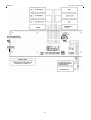
The PGM output signalizes switching the dialer into the condition
of a loud alarm. It can also signalize switching into the ready mode
(see the dialer configuration). It is an "open collector" type output
and can be added with an additional relay to activate signaling
devices. The maximum current at the output should not exceed
500 mA.
INSTALLER CODE
The default setting is 1234. It is used to exit the current operation
mode (together with the alarm mode) and to enter the
programming mode.
PROGRAMMING MODE
You can go to the programming mode from any mode by entering
the installer code.
[#] – starts the code entry
[Installer code][#]
USER CODE
The default setting is 1111. It is used to interrupt the alarm action,
enter or exit the ready mode.
You can enter one of the 6 programming procedures by selection
of the suitable key (1..6). You can exit any of the procedures by a
single or double use of the [#] key.
If you change the dialer configuration from a single message dialer
to a double message dialer or inversely during the dialer
programming, you must enter the configuration procedure no. [5]
and select the proper option prior to programming the telephone
numbers and pre-recording the announcement(s).
CONFIGURATION CODE
The default setting is 1234. It is used to enter the dialer
configuration procedure in the programming mode.
DURESS CODE
Entering the sequence of characters [*][digit][*] in the blocking or
ready mode, results in activation of the duress alarm. The digit
between the [*] symbols is preset as [0] and can be reprogrammed
during the dialer configuration procedure.
[1] Programming the numbers
In case of a single message dialer, you can program up to 10
telephone numbers (maximum a 16-digit number) marked from L1
to L10 in the list. In case of a double message dialer, you can
program up to 5 numbers in the list "A" (from A1 to A5) and up to
5 numbers in the list "B" (from B1 to B5). You use the [*] key to go
to the next number in the list. Any numerical key resets the old
number and starts a stand-by mode of waiting for the new number
digits.
You end the number entry with the [*] key. The [#] key used during
entering the telephone number digits enters the character "P"
(pause). The character makes the system wait for a dial tone. If the
signal is recognized, the device starts dialing the next digits of the
number. If the dialer does not recognize the continuous signal
within 4 seconds, it unconditionally starts dialing the next digits of
the telephone number. You can skip the telephone number
programming function when getting to the last number in the list
(L10 or B5) or earlier by pressing [#]. The character P in the
telephone number is used when dialing long distance connections
(e.g. 0P22340967), when you expect a long time of waiting for an
telephone exchange tone or if for any other reasons you have to
force an interruption in dialing (which is often required for older
type subscriber telephone exchanges).
CODE ENTRY \ ALARM RESET
If you want to enter the user or installer code, you should stop the
current mode with the [#] key. The system will display the following
message [Enter code
_ ], then you should enter the correct
installer or user code and end it with [#]. The program allows three
attempts of entering the code. After the third unsuccessful attempt,
the program blocks the keypad for 3 minutes and records the
[Wrong code entered] message in the event list. If within 30
seconds from the moment of displaying the [Enter code] message
the code is not entered, the attempt will be qualified as the wrong
code. You can interrupt the alarm action or a pause after it by
entering the installer or user code. The alarm action can be also
interrupted by releasing the C blocking input for a time longer than
200 ms.
DIALER TESTING
Each time the dialer enters the ready mode, it previously tests the
telephone line, A and B alarm inputs and microprocessor system.
The telephone line tests check if a telephone exchange tone
exists. The alarm line test checks if there are no alarm tones in the
lines during the test. The microprocessor system test verifies its
correct operation. The test end is signalized with displaying the
[Negative tests N] message, where the number N stands for the
quantity of negative tests. The test results are recorded in the list
of events.
[2] Recording/Playing of Alarm Announcement
Note !
After each time a new announcement is recorded, you should
listen to it using the headphone output to make sure the
announcement is readable and, if needed, repeat recording.
You should record alarm announcement(s) by speaking to the
built-in microphone from a distance of about 20cm. The start of
recording is signalized with an acoustic tone. The recording is
ended automatically after the available recording time has elapsed
(14s for a single message dialer or 7s for a double message
dialer). The duration of an announcement can be shortened by
pressing [#]. You can exit the Record/Play procedure with the [#]
key.
SWITCHING ON THE POWER SUPPLY
After the power supply has been switched on, the dialer checks the
value of the power supply voltage and if it is too low, the [Low
power supply voltage] message is displayed. Until its value
reaches the suitable level, the dialer will not go to the next steps of
the start procedure. When the power supply voltage is higher than
9.5V, the dialer will display the [Roger DIAL1602] message and
-2-