1
Planning Missions
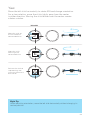
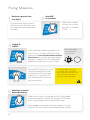
To plan a mission, download a ground station application from
3dr.com/iris/info, and install onto your laptop or Android device.
Mission Planner for Windows
DroidPlanner 2 for Android
1
Power IRIS, connect the radio to your laptop
or Android device, and select Connect.
Connect the blue end of the
Android adapter to your device
and the black end to the radio.
Select Connect.
2
Connect the USB adapter to the
radio and your laptop. Select
AUTO, 57600, and Connect.
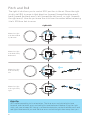
Configure waypoints.
Select Edit and tap to add
waypoints, or select the brush
tool and draw a path for IRIS
to follow.
3
APM Planner for OS X
Select Flight Plan, and click to
add waypoints. Select the green
arrows at the bottom of the
screen to configure altitude and
change waypoint types.
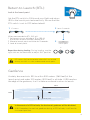
Save the mission to IRIS.
Select the option menu in
the top-right corner, and
select Send Mission.
Select Write WPs.
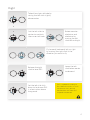
When flying missions, we recommend changing the GPS
failsafe behavior to set IRIS to land in the event of a loss of
GPS signal. For instructions, visit 3dr.com/iris/info.
19