1
wine-av-20040914-24.i386.rpm. You can download this version of WINE from
http://oss.oracle.com/AutoVue.
■
■
■
■
■
If installing on a Oracle Linux 6.X OS, run the YUM update agent on your Oracle
Linux distribution to download the latest Xvfb and Mesa packages. If the Xvfb
version is incorrect, 3D files may not display. For Oracle Linux 5.X install Xvfb
version 6.8.2 or later. Make sure you install the Xvfb with XRender and GLX
extensions. Refer to the Oracle AutoVue Client/Server Deployment Installation and
Configuration Guide for more information.
When upgrading AutoVue, if the client and server versions do not match,
AutoVue displays an error message indicating the incompatibility. Ensure that the
client jars are upgraded in all codebase locations after you upgrade the server.
AutoVue documentation, with the exception of the User's Manual, are no longer
included in the AutoVue installation. Refer to "Documentation Updates" for more
information.
For pre-requisites and complete installation instructions, refer to the Oracle
AutoVue Client/Server Deployment Installation and Configuration Guide.
For secure installation instructions, refer to the Oracle AutoVue Client/Server
Deployment Security Guide.
System Requirements
The system requirements for Oracle AutoVue Client/Server Deployment 20.2.3 are
provided in the following table:
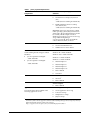
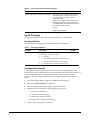
Table 1
System Requirements
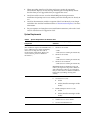
Components
Oracle-Certified Operating Systems and
Software
Server
Windows
(The installation requires about 400MB of free
space. Additional space will be required by
AutoVue for storing other data such as
streaming files and markups.)
■
Windows Server 2008
- 32-bit
- 64-bit (AutoVue running in 32-bit mode)
■
Windows Server 2008 R2
- 64-bit (AutoVue running in 32-bit mode)
Important: Windows Server 2008 R2 has
improved memory management
compared to Windows Server 2008. It is
recommended that you run AutoVue on
Windows Server 2008 R2 for better
memory handling and long-term stability.
■
Windows Server 2012
- 64-bit (AutoVue running in 32-bit mode)
2