1
hmsc Example 2
msc Example 1
i
mscdoc Example 3
j
A
a
A
b
?
B
C
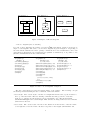
(a) msc diagram
(b) hmsc diagram
(c) mscdoc diagram
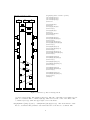
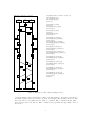
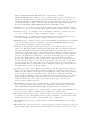
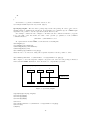
Figure 1: Examples of different diagrams
• mscdoc diagrams (msc documents)
For each of these diagrams, the package provides a LATEX environment. Figure 1 shows an example of each diagram. The source code for these diagrams is given in Figure 2. Depending on
the environment, different msc macro package commands can be used. Furthermore, since each
environment is implemented as a pspicture (see pstricks documentation), it is possible to use
pstricks commands inside the msc environments.
\begin{msc}%
{Example 1}
\declinst{i}{$i$}{}
\declinst{j}{$j$}{}
\nextlevel
\mess{a}{i}{j}
\nextlevel[2]
\mess{b}{j}{i}
\nextlevel
\end{msc}
\begin{hmsc}%
{Example 2}%
(0,0)(4,4.65)
\hmscstartsymbol{S}(2,3.75)
\hmscconnection{c}(2,3.25)
\hmscreference{R1}{A}(2,2.5)
\hmsccondition{C}{?}(2,1.5)
\hmscendsymbol{E}(1.5,0.5)
\arrow{S}{c}
\arrow{c}{R1}
\arrow{R1}{C}
\arrow{C}
[(2.5,1)(3,1)(3,3.25)]
{c}
\arrow{C}[(1.5,1)]{E}
\end{hmsc}
\begin{mscdoc}%
{Example 3}%
(0,0)(4,4.65)
\reference{A}(1,3.0)
\reference{B}(3,3.0 )
\separator{2.0}
\reference{C}(2,1.0)
\end{mscdoc}
Figure 2: Source code for diagrams of Figure 1
The msc environment provides most functionality of the package. The following concepts
should help in understanding the user-commands of this environment.
current height The current height of an msc is a length that indicates the y-postion relative to
the top of the msc frame. The msc drawing commands use this y-position to draw msc
symbols, e.g., instance heads, messages, actions, and instance feet. The internal length
\msc@currentheight is the current height. This variables is changed whenever the command
\nextlevel is invoked.
current width The current width of an msc is the distance from the left side of the msc frame
to the right side of the msc frame. As such, it depends on the lengths \envinstdist and
2