1
Introduction
Visualizer is a comprehensive, user definable real-time audio analysis tool designed
to give you rapid access to the information you need to fully understand your audio.
Visualizer is capable of providing a great deal of detailed information, coupled with
options that allow a high degree of user customisation. This manual is intended to
help both the novice and professional quickly navigate the interface and achieve the
results desired.
The manual is divided in to several sections, as listed on the contents page (2).
The overview section is intended to give the new user a broad run-through generic
operations such as selecting different views, opening control panels, etc. This section
is recommended reading for anyone new to the software, introducing concepts and
highlighting themes that run through the interface, improving workflow and intuitive
operation.
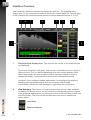
The displays and controls section is a detailed reference to every available
parameter view by view. Visualizer cannot be ‘broken’ by changing parameters and it
is recommended that the user refer to this section whilst using Visualizer in practice
so that the direct result of modifications can be seen in the displays.
An introduction to FFT analysis is also provided for those who are interested in
understanding how digital audio analysis works within Visualizer. The strengths and
weaknesses of this approach are discussed, which will allow the more advanced user
to make informed decisions, particularly with respect to the Set-up options, which
allow the user to adjust several of the underlying algorithmic parameters.
3
© 2014 NUGEN Audio