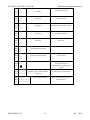
1
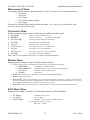
PVI 10kW / PVI 13kW / PVI 15kW Installation and Operation Manual Measurements Menu This displays the data retrieved from the inverter. Use the buttons to move up and down the list: o AC Energy o AC Power o AC Voltage o AC Current (3 phase average) o DC Voltage Pressing ESC will take the screen back to the start menu. Note: data will only be available when inverter is awake and communicating. Set Inverter Menu Displays inverter parameters, some of which may be modified with the keypad. Inverter ID Serial port address/ID of the inverter Serial port baud rate (Currently not adjustable) Baud Rate Vac Very High AC Voltage Critical High (Not adjustable) Vac High AC Voltage High (Not adjustable) Vac Low AC Voltage Low (Not adjustable) Vac Very Low AC Voltage Critical Low (Not adjustable) Fac Low AC Frequency Low (Not adjustable) Fac Very Low AC Frequency Critical Low (Not adjustable) Fac High AC Frequency High (Not adjustable) Note: data is only available when inverter is awake and communicating. Monitor Menu Displays monitor settings that may be modified with the keypad. 1. LAN Local Area Network configuration, applicable only for SolrenView monitoring a. DHCP Mode See SolrenView manual on DHCP b. Static/Fallback IP If DHCP is turned on, this is then used as the fallback IP c. Gateway IP IP address of LAN’s default gateway. d. Netmask Subnet mask 2. Date/Time Manual time set. This may be overwritten by scheduled NIST updates. 3. Reboot Reboots the monitor 4. Remote SRV This starts the transmit process necessary for SolrenView monitoring. Units that are ordered with 5. SolrenView monitoring will have this field turned on. Caution: Enabling this field when SolrenView service has not been confirmed/authorized may result in unnecessary wear on the unit. Reset SRV Settings are cleared to factory defaults. Caution: This will clear Revenue-grade KYZ counters. KYZ Meter Menu Displays KYZ readings, if installed. See Solrenview manual for KYZ installation. 1. 2. 3. AC Energy AC Power Pulse Weight DOCR-060001 rev2 Cumulative energy count Power reading Multiplier to convert pulses to WH for display. F For example Pulse Weight = 10 WH 1 pulse = 10 WH 21 July 7, 2010