1
2
Picture Combinators
A pict is the basic building block for pictures in Slideshow.
Roughly, a pict consists of a bounding box and a procedure for
drawing relative to the box. Ultimately, a slide is represented as a
single pict to be drawn on the screen.
As a running example, suppose that we wish to illustrate graph
searching to novice programmers, showing how a graph of people
is traversed to find the name of a person who lives in a particular
city. The illustration will contain boxes labeled with names and locations, directed connections among the boxes, an arrow indicating
the starting box, and a cloud that stands in place of many unspecified boxes and connections.
2.1
Pict Basics
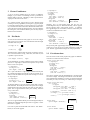
To create the basic elements of the graph, we can use rectangle
and cloud. The rectangle and cloud functions take the height
and width of the new pict.
(rectangle 20 10)
To label the boxes with the names of people, we need picts for text.
The text function takes a string, a font class, and a font size, and
it produces a pict for the text.
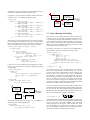
Naturally, the b in hb-append means that the picts are
bottom-aligned as they are stacked horizontally, and hc-append
and ht-append center- and top-align pictures. In addition,
hbl-append aligns text on baselines, which is useful when picts
contain text in different fonts or sizes.
(cc-superimpose
(rectangle 80 30)
(vl-append
(hbl-append
(text "Name: " ’roman 6)
(text "Angua" ’roman 10))
(hbl-append
(text "Home: " ’roman 6)
(text "Überwald" ’roman 10))))
Name:
Home:
Angua
Überwald
(cc-superimpose
(rectangle 50 20)
(text "Angua" ’roman 10))
Angua
The cc part of the name cc-superimpose indicates that the picts
are centered horizontally and vertically as they are stacked. If, instead, we want the label in the top-left of the rectangle, we can use
lt-superimpose.
Angua
To illustrate distances, our boxes need to contain both a person’s
name and home. We could put a name in the top-left of a rectangle
and the home in the bottom left, but we’d prefer to center both together. The vl-append function stacks picts vertically, instead of
on top of each other.
(cc-superimpose
(rectangle 50 30)
(vl-append
(text "Angua" ’roman 10)
(text "Überwald" ’roman 10)))
2.2
Pict Abstractions
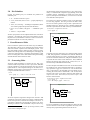
Since we need to create several people in the graph, we should abstract the box construction into a function.
Angua
To get a labeled box, we need to combine a text pict with a rectangle
pict. The cc-superimpose function stacks pictures on top of each
other to create a new picture.
(lt-superimpose
(rectangle 50 20)
(text "Angua" ’roman 10))
Name: Angua
Home: Überwald
More precisely, hbl-append aligns text using the bottom baseline
in each pict, in case one pict is a vertical combination of other text
picts. The htl-append function aligns text using top baselines.
(cloud 30 20)
(text "Angua" ’roman 10)
(cc-superimpose
(rectangle 80 30)
(vl-append
(hb-append
(text "Name: " ’roman 10)
(text "Angua" ’roman 10))
(hb-append
(text "Home: " ’roman 10)
(text "Überwald" ’roman 10))))
Angua
Überwald
(define (person name home )
(cc-superimpose
(rectangle 80 30)
(vl-append
(hbl-append
(text "Name: " ’roman 6)
(text name ’roman 10))
(hbl-append
(text "Home: " ’roman 6)
(text home ’roman 10)))))
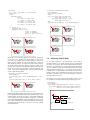
One obvious problem with this implementation is the hard-wired
size of the rectangle. It should grow to match the size of the labels,
plus a small amount of padding. To create a pict whose size depends
on another pict’s size, we can use pict-width and pict-height.
(define (person name home )
(let ([content
(vl-append
(hbl-append (text "Name: " ’roman 6)
(text name ’roman 10))
(hbl-append (text "Home: " ’roman 6)
(text home ’roman 10)))])
(cc-superimpose
(rectangle (+ 10 (pict-width content ))
(+ 10 (pict-height content )))
content )))
Name:
The l in vl-append means that the picts are left-aligned as they are
stacked. We could right-align the picts with vr-append, or center
them with vc-append.
(define angua
(person "Angua" "Überwald"))
If we want to prefix the boxed fields with “Name:” and “Home:”
labels, we can use hb-append.
(define brutha
(person "Brutha" "Omnia"))
Home:
Name:
Home:
Angua
Überwald
Brutha
Omnia