1
File Browser
SHORTCUT
Show/Hide
+
+B
× + Ctrl + B
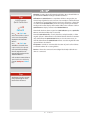
The File Browser provides easy access to your complete file system and
directly links to convenient image folders such as: Capture Destination,
Favorites and Collections. A right click in the File Browser opens a menu with
command options for: Add to Favorites, Use as Capture Destination, Reveal in
Finder, New Folder. Any folder name can be edited by clicking on the name
itself, though volume names cannot be changed.
Layout
5IFWJFXDBOCFNBEFOBSSPXFSPSXJEFSPSJUDBOCFIJEEFODPNQMFUFMZ
1
2
r
%SBHUIFEJWJEFSUPUIFMFGUPSSJHIUUPBMUFSUIFXJEUIPGUIFWJFX
r
$IPPTFMenu > Window > Show / Hide Browser PSVTFTIPSUDVU
/PUFUIPVHIUIBUUIFFile BrowserDBOOPUCFMPDBUFEBOZXIFSFFMTFCVUPO
UIFMFGUIBOETJEFPGUIFMBZPVU
Navigation
r $MJDLPOUIFBSSPXT1 on the header bar to navigate through recent
GPMEFST5IFGPMEFSOBNFBQQFBSTJOUIFFile Browser menu 2
r $MJDLPOUIFFile BrowserNFOVUPSFWFBMBMMGPMEFST$MJDLPOBGPMEFSUP
display contents in the Thumbnail Browser
r $MJDLPOUIFEJTDMPTVSFUSJBOHMFT3 to successively navigate to the desired
GPMEFS$MJDLPOUIFGPMEFSUPEJTQMBZDPOUFOUTJOUIFThumbnail Browser
List of files
Capture Destination:$POUBJOTUIFGPMEFSTUIBUTUPSFJNQPSUFEPSTBWFE
DBQUVSFT
3
Tip
Click on a folder name to edit it.
8IFO1IPDVTJTMBVODIFEGPSUIFñSTUUJNFB Phocus Captures folder is auUPNBUJDBMMZDSFBUFEBOEBQQFBSTPOUIFEFTLUPQCZEFGBVMU5IJTGPMEFS
CFDPNFTUIFBVUPNBUJDEFTUJOBUJPOGPMEFSGPSBMMDBQUVSFTXIFUIFSUIFZ
BSFJNQPSUFEGSPNB$'DBSEPSEJSFDUMZGSPNBUFUIFSFEDBNFSBVOUJMZPV
DIPPTFPUIFSXJTF
:PVDBOBDDFTTUIF Phocus Captures folder in the File Browser panel under the
Capture DestinationIFBEJOH$MJDLJOHPOUIF Phocus Captures JDPOXJMMDBVTFUIF
contents to appear in the Thumbnail Browser
0UIFSGPMEFSTDBOCFDSFBUFEPSDIPTFOBTEFTUJOBUJPOGPMEFSTJOTUFBEPGUIF
Phocus Captures BTGPMMPXT
1. Create a new folder and name it.
Tip
Double click folders to expand or
collapse them.
2. Choose the 'JMF#SPXTFS and navigate down through the menu to the new
folder.
3. Ctrl click / Right click it to display the pop up menu where you can select
6TFBT$BQUVSF%FTUJOBUJPO.
20
File Browser