1
April 2008
1.0
WalkingHotSpot User’s Guide for S60
Version 1.0
About the Application
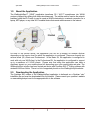
The WalkingHotSpot™ (“WHS”) application transforms 3G / Wi-Fi™ smartphones into WLAN
routers or hotspots by utilizing both radios simultaneously. The cellular radio is used as the network
backhaul, while the Wi-Fi radio is used to create a WLAN culminating in a network connection for a
laptop, MP3 player, or any other Wi-Fi enabled device that needs remote access to the Internet.
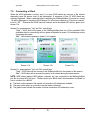
As seen in the picture above, the application can act as a hotspot for multiple devices
depending on the service level for which the application is configured. There are currently two
service levels (SL): Basic and Professional. In the Basic SL, the application is configured to
work with only one WHS client. In the Professional SL, the application is configured to support
up to a maximum of 5 WHS clients. Please note that using this application can have a
significant impact on your mobile phone bill depending upon your current data rate plan. The
WalkingHotSpot solution has been tested and works with Symbian S60 3rd Edition phones with
wireless LAN from Nokia. There is a list of supported phones on the WalkingHotSpot website.
2.0
Downloading the Application
The Symbian S60 version of the WalkingHotSpot application is delivered as a Symbian “sisx”
installation file and must be downloaded from the Internet. Please consult your operator’s website
or www.walkinghotspot.com for the appropriate link to the software.
3000 Aerial Center Parkway, Suite 103
Morrisville, NC 27560
3
PHONE: +1.919.465.2266
FAX: +1.919.465.2111