1
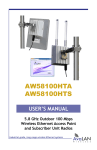
AW58100HTA, HTS
User’s Manual
Quick Start Guide
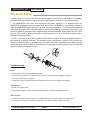
Step 1. Radios are Preconfigured out of the Box
Step 2. Mount Radios
Step 3. Align Radios
Step 4. Attach Cables
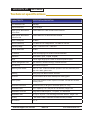
System Default:
IP Address: 192.168.88.10 (Subscriber Unit)
192.168.88.12 (Access Point)
Username: admin
Password: password
Best Practices:
Tools Needed:
1. Ensure clear visual path between radios before deployment
- ½ inch wrench
2. Test on bench before deployment
- Large Phillips head screwdriver
3. Networking Cable:
- Small flat screwdriver
- CAT 6 Shielded Outdoor Grade
- For AW58100 - maximum length 300 ft/100 meters
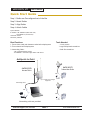
Multipoint-to-Point
AW58100HTS
Subscriber Units
AW58100HTA
Access Point
POE
Up to 5 miles Line-of-Sight
Supported
Networking Cable*
POE
POE
*Networking cable not provided
Technical Support (650) 384-0000
PAGE 3
www.avalanwireless.com