1
Installation on Windows
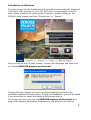
The start screen for the installation will normally be automatically displayed.
If the auto-start function of your CD/ DVD drive is deactivated, open the
start screen manually by going to My Computer, double clicking on the
CD/DVD drive symbol and then “Starter.exe” or “Starter”.
Once you are at the CD start screen, choose your language and then click
on “Install DENOISE projects professional”.
Choose German, English or French as setup language and follow the
installation assistant’s instructions. During the installation, you will be asked
if you would like to install the Adobe® Photoshop plug-in.
If you agree to this, you can use DENOISE projects professional as a
plug-in for Adobe® Photoshop. Alternatively, the plug-ins can also be
2