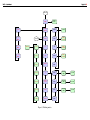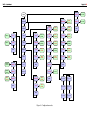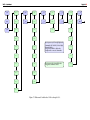
1
YACC — User Manual
Page 3 of 17
is shown. Next long press ends the trip.
The action is confirmed with
DONE
YACC switches to BATT mode for 20 seconds immediately after key was turned
on. During that time period a single
long press resets and begins TRIP 1.
During radio use a long press (if Defaults
not connected with another command)
changes antenna position to the oppo- Astra F
site one.
PRESETS → ASTRA F. Long press recalls
default fuel measurement values for Astra F.
Turning the key off
Sport mode
YACC turns off after 30 seconds of idleness.
Long press in basic mode switches
to sport mode. Short presses cycle
through runs: 1/4 mile, 0. . .60, 0. . .80,
0. . .100 km/h.
YACC automatically prepares to new
run each time vehicle is stopped. Run
name (1/4, 60, 80, 100) is shown on the
left side and word ready RDY on the right
one.
1/4 RDY
Timing commences automatically upon
detection any motion. The percent relative value of distance (speed) is shown
on the left side. Run time in second is
shown on the right side.
47% 10.2
At the end of the run timing stops and
run name is shown once more on the
left side.
1/4 21.0
Long press in sport mode switches back
to basic mode.
FUEL → COEF
FUEL → SOURCE
3 669 000
L
Astra G
Configuration
PRESETS → ASTRA G. Long press recalls
Pressing and holding button for 5 sec- default fuel measurement values for Asonds in tachometer mode switches to tra G.
configuration menu. A ”stereo” symbol
FUEL → COEF
27 700
appears on 8–digit display and ”Dolby”
FUEL
→
SOURCE
F
symbol on 10–digit one. 20 seconds
idleness switches automatically back to
basic mode.
Speed and distance
Calibration
Editor
Editor allows to enter numerical values and is available in selected working
modes. Editor is always entered with
a long press. Next short presses cycle through successive digits and commands CANCEL and SET. The SET command is visible only when a value has
been changed and a new value is in
proper range. Long press during SET
command stores a value, ends editor
Manual antenna steering
mode and returns to the mode editor
When you turn radio on an antenna was started from.
Long press during CANCEL command
status
ends editor mode without any changes.
ANT ON
or
Long press during digit selection
ANT OFF
switches into a mode which allows to
is shown for 5 second. Short press change digit value. Short presses sechanges the state of the antenna to the lect new value and a long press accepts
opposite one.
it.
SPEED → DISTANCE. Use the following
procedure.
Begin TRIP 1 and reset
the mechanical distance counter at the
same time. Travel some tens of kilometers. With a long press switch to editor mode and enter traveled distance in
meters. The calibration coefficient cdist
will be calculated automatically.
One needs to remember that most
mechanical counters work in two directions — count downward while going backward. YACC uses a pulser and
does not distinguish directions.
Instantanous speed averaging
SPEED → NOISE. YACC uses a simple algorithm to achieve better precision of
speed measurement. The measurement process lasts approximately SPEED
→ T MIN. Number of recorded impulses
correspoding to traveled distance is divided by measurement time.
Traveled distance impulses are generated by special devices called pulsers.
Construction of pulsers varies. Very often they are based on rotating wheel.
Mechanical inaccuracies of workmanship, looseness, axis and propel cable
vibrations can cause additional errors.
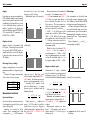
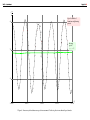
Figure 8 shows calculations of instantaneous speed based on recorded times
of two successive impulses.
Result analysis indicates that for
this specific case pulser generates 15
impulses with every revolution. Therefore it would be better to use time periods corresponding to multiply of 15
impulses.
In editor mode enter the value SPEED
→ NOISE in range 0. . .99. Value 0 turns
averaging off. If during single measurement less than 2·SPEED → NOISE
impulses are recorded (small speeds)
than instantaneous speed is calculated
without averaging. For other cases the
biggest multiply of SPEED → NOISE impulses is used in calculations.
Calibration coefficient
Signal selection
SPEED → COEF. In editor mode enter
cdist value in range 1. . .65 535 equal to
number of impulses corresponding to 1
km.
SPEED → SOURCE. The letter R corresponds to rising edge and the letter F
to falling one. Long press changes between R and F.