1
System Unit
1.5
Error Diagnostics
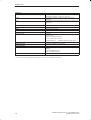
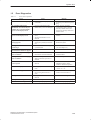
Table 1-1
Errors in PC Operation
Error
Cause
Remedy
Power-ON LED does not light up
Power supply is not properly
connected
Check power supply connections, power cable and power
plug
The “Invalid configuration
information. Press the F1 key for
continue, F2 to run Setup utility”
appears on the display/screen
Incorrect configuration data
Buffer battery is low or damaged
Press “F2” key, check the
configuration data in SETUP,
enter any default values, and
check error messages in the first
SETUP menu
The “No boot device available”
appears on the display/screen
There is no boot diskette in the
drive
Wrong hard disk drive set in
SETUP
Use the “Fixed disk function” in
SETUP
“Keyboard stuck key failure”
message appears
A key has become blocked
during the system keyboard selftest
Check the keyboard
Restart the system
Booting of the PC aborted after
several beeps
An error has occurred during the
system self-test
Check the hardware
(see also Chap. 2.12)
Every time a key is pressed, a beep
is heard and no characters appear
Keyboard buffer overflow
<CTRL> <PAUSE>
Not-ready message when trying to
write to a diskette
No diskette has been inserted
Diskette has not been formatted
Insert diskette
Format diskette
Write-protect error when trying to
write to a diskette
Diskette write-protect activated
Write-protect hole open on 3.5”
diskette
Cancel write protection
COM1,COM2, LPT1 or MPI/DP
do not respond
Ports have been disabled in
SETUP
Enable COM1,COM2, LPT1 or
MPI/DP in SETUP under
submenu “Hardware Options.”
<\> key is not displayed
Wrong keyboard driver is being
used
Load correct keyboard driver
<ALT> <9> <2>
Mouse not working
Trackball does not rotate
No or wrong mouse driver is
used
Clean trackball and housing
Load correct mouse driver
Mouse pointer cannot be moved
PS/2 port has been disabled in
SETUP
Check SETUP settings
Mouse pointer moving erratically
Trackball dirty
Clean trackball and housing
Drive cover cannot be opened
Filter cap not properly fixed
Push filter cap in proper position
SIMATIC PC BI10/FI10/FI15, Technical Description
C79000-G7076-C773-03
1-39