1
DBMZ 868 and DBMZ 908 Version 2+1
Advanced User Manual
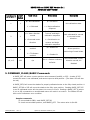
Configuration
parameter #
1
Length
(bytes)
Read values
Write values
0 = Not calibrated
0 = No Action
1
Unit calibration state.
1 = Calibrated
2
1
0 = Motor direction
normal
1 = Reversed motor
direction
3
1
1,2, or 3
129
Description
1 = Begin calibration
sequence
0 = Set direction to
“normal” and begin
calibration sequence
1 = Set direction to
reverse and begin
calibration sequence
0 = Tilt feature not
enabled
0 = Disable tilt
1 = Tilt feature
enabled
1 = Enable tilt
n/a
0 or 1 = Return to factory
defaults
Unit calibrated for normal
or reversed motor
direction.
Allows precision
positioning of wood blinds.
Unit uncalibrated, motor
direction normal, tilt
disabled
5. COMMAND_CLASS_BASIC Commands
A BASIC_GET will return a motor position value between 0 and 99, or 255. A value of 255
means the motor is not calibrated, and cannot report a valid position. (The Motor LED will also
be red.)
A BASIC_SET 0 will move the shade of a properly calibrated motor to the fully closed position. A
BASIC_SET 99 or 255 will move the shade to the fully open position. Sending BASIC_SET 255
to an un-calibrated motor will also cause it to move to a limit. Sending a BASIC_SET X (where
X is 1 to 99) command to an uncalibrated motor will result in no motion. The Status LED will
blink red to indicate an error condition.
Sample commands:
To move shade to 50%, send BASIC_SET 50.
To check current shade position, send BASIC_GET. The return value is 0 to 99.
18 August 2009
Rev. A
©2007-9, Electronic Solutions, Inc.
page 2 of 6