1
Application Note
Product:
Document Number:
5001
Link
Keywords: Halted Network
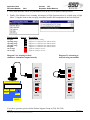
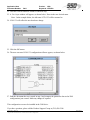
4. Next, hold down the <Shift> key and double-click on the Get Overruns or other get items.
5. Finally, if the Monitor List is counting, the integrity of Link System needs to be verified using a Light
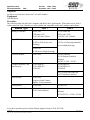
Meter. Using the chart on the next page, determine possible bad components in the Link Network.
Signal quality
marginal
operating range
operating range
operating range
marginal
out of range
out of range
db level
-18
-21
-24
-27
-30
-33
-35
Description
full power-factory setting
half power is reached at each -3db increment
half power is reached at each -3db increment
half power is reached at each -3db increment
half power is reached at each -3db increment
signal too weak for receiver
signal too weak for receiver
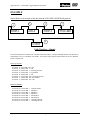
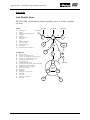
Diagram 1 is a drawing to check
simulate a transmitter output intensity.
Diagram 2 is a drawing to
network using one module.
PRIMARY
PRIMARY
RCV
RCV
XMT
XMT
M L H
M L H
LAUNCH
POWER
LAUNCH
POWER
OPTICAL POWER METER
dB / dBm
SECONDARY
SET REF
RCV
RCV
XMT
XMT
M L H
M L H
ON/OFF
SECONDARY
LAUNCH
POWER
LAUNCH
POWER
OPM 4
L5311
L5311
NOYE
If you have questions, please call the Product Support Group at (704) 588-3246.
22-Sep-04
j:\app_note\5000 - link hardware\5001 ssd link network diagnostics.doc
Page 2 of 2